
Care Identity Service authenticators

Care Identity Service (CIS) supports a range of strong authenticators - the different methods you can use to sign in.

Overview

Users can authenticate using 7 different methods. The image below shows an overview of our authenticator options.
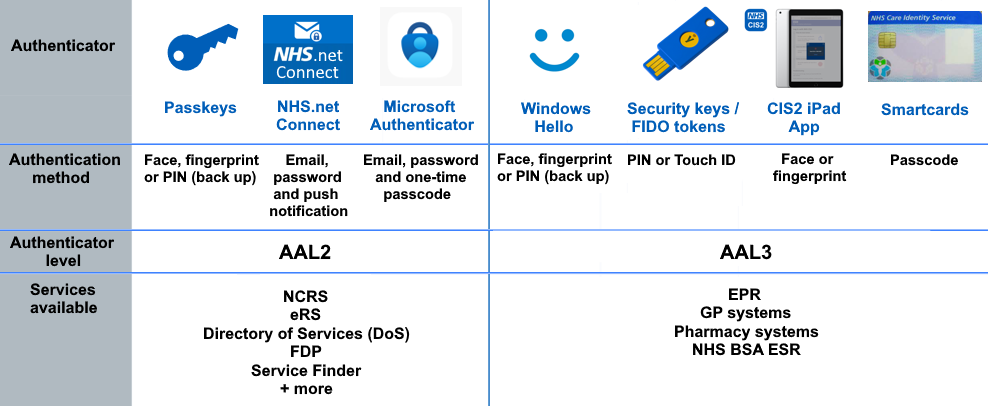
Overview of CIS2 authenticators and their security levels

See a full list of AAL2-supported applications.


How to get an authenticator

Users are issued with an authenticator by a local administrator known as a Registration Authority (RA).

Users can self-register non-smartcard authenticators.


Assurance levels

CIS authenticators come in two ‘assurance’ levels:

  • AAL2 – ‘high confidence’ 

  • AAL3 – ‘very high confidence’ 

For security reasons, some applications are restricted to AAL3 authenticators. Other applications allow both AAL2 and AAL3 authenticators. We are working to increase the range of applications that allow AAL2 authenticators.

For more details, see websites and apps you can access with CIS2 Authentication


Applications that still use CIS1 Authentication

All NHS digital services use CIS2 Authentication, and can be used with our full range of authenticators, subject to authenticator level restrictions.

Some commercial software applications still use our legacy CIS1 authentication. These applications are restricted to using smartcards over HSCN.

CIS1 Authentication is deprecated and scheduled for retirement by the end of February 2027. All new integrations must be with CIS2 Authentication, and we are working to migrate all existing applications from CIS1 to CIS2.

We are working with software providers to migrate all commercial software applications to CIS2 authentication. 

For more details, see websites and apps you can access with CIS2 Authentication

Migrating to CIS2 Authentication


Authenticators in detail

AAL2 authenticators

These authenticators can only be used with applications that are enabled for AAL2.

Passkeys

An authentication option requiring fewer steps to log in for compatible devices: simply tap with your fingerprint or look into your device's camera to authenticate.

Read more about using passkeys.

NHS.net Connect (formerly NHSmail)

Connect your NHS.net email address to your Care Identity and log in to systems like the National Summary Care Records Service and Cervical Screening Management System with the same multi-factor authentication process you use to log in to your email.

Sign in using your email, password and a push notification from the Microsoft Authenticator app.

Read more about using NHS.net Connect.

Microsoft Authenticator

Microsoft Authenticator is currently being used to access National Care Records Service, MESH and e-Referral Service by organisations across health and care settings.

Authenticate by entering your email address, password and a 6-digit security code from the Microsoft Authenticator app on your phone.

Read more about using Microsoft Authenticator.


AAL3 authenticators

These authenticators can be used with all applications that use CIS2 Authentication (AAL3 and AAL2).

Windows Hello

A great alternative to smartcards that requires no software installation, certificate renewal or large hardware to carry around.

Log in to applications just by showing your face or fingerprints.

Read more about using Windows Hello.

Security keys

Security keys are typically small physical USB devices that require no software installation or certificate renewal. They're small and convenient enough to be attached to a set of keys or a lanyard.

Simply enter a PIN and physically touch the security key to log in.

Read more about using security keys.

iPad app

The NHS CIS2 iPad app is a great option for users who work in environments that require ultimate mobility. There's no need for a smartcard or reader.

Log in to applications just by showing your face or fingerprints.

Read more about using the iPad app.

Smartcards

Smartcards are credit card-sized ID cards. Users authenticate by inserting their smartcard into a reader and entering their passcode. They require specific software to work.

Learn more about using smartcards.


Shared devices

Many organisations require their staff to work across shared desktops, tablets or ward terminals. CIS offers a wider range of authenticators, giving you more flexibility in how staff access the systems they need.

Before deciding which authenticators to promote within your organisation, check which applications you use and any technical specifications related to the authenticator, and confirm with your application supplier what they support.

For systems supporting AAL3

Staff on shared devices, desktops or kiosks can use smartcards or security keys. Additionally, certain models of security key can be plugged easily into tablets.

For systems supporting AAL2

Staff can authenticate using Microsoft Authenticator, NHS.net Connect (formerly NHSmail) or passkeys - all options that allow a user to authenticate with their mobile device. This cross-device authentication allows a health and care professional to authenticate using a push notification, one time passcode, or biometrics on their phone.

Offering a broader portfolio of authenticators can:

  • help cut smartcard support issues
  • speed up access
  • give your organisation more flexibility in how authentication works across shared or mobile devices

Guidance for developers

As an application provider, when you integrate your software with CIS2 Authentication, you’ll need to decide which assurance level is suitable for your application.

For more details, see our authenticator guidance for developers.

Last edited: 17 March 2026 10:21 am