CIS2 Authentication
Provide a secure single sign-on for your health and social care software by integrating it with CIS2 Authentication.
About this service
CIS2 Authentication is a secure single sign-on service used by health and care professionals to access patient information and clinical data. It is part of Care Identity Service (CIS).
It opens up new authentication options as alternatives to smartcards, including iPads, security keys, Windows Hello and Microsoft Authenticator.
It is required to access some of our national APIs.
If you’re developing health or social care software, you might want or need to integrate it with CIS2 Authentication.
How it works
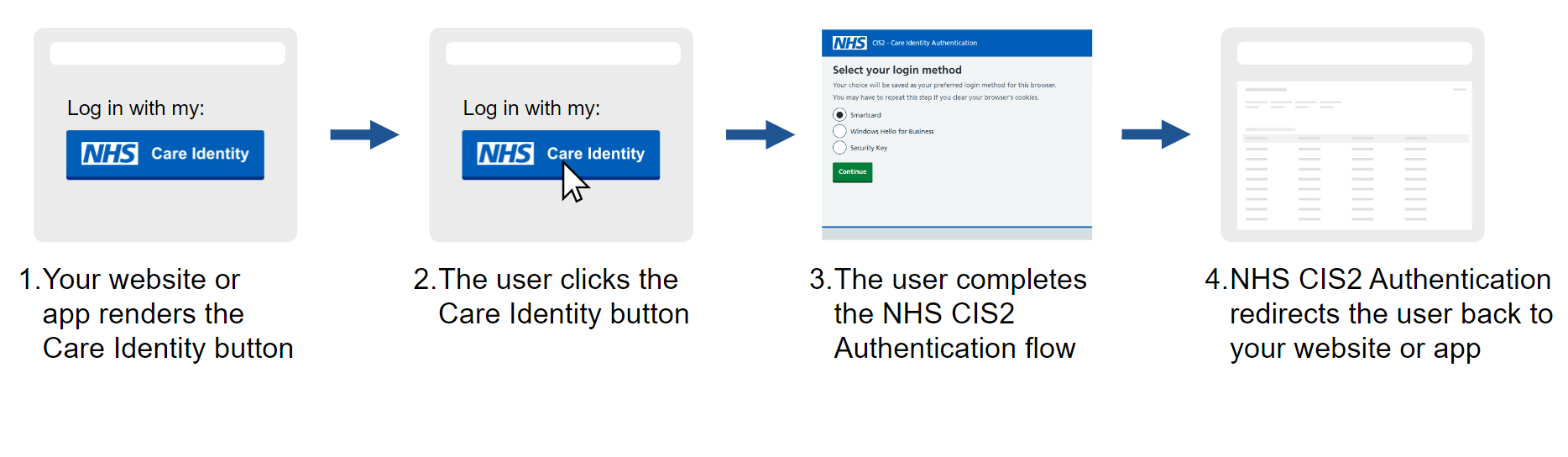
CIS2 Authentication follows industry best practices and adheres to Open ID Connect (OIDC) and NIST standards for authentication.
Users are assigned a suitable authenticator by a local administrator called a Registration Authority.
Users can then use their authenticator as a single way to access a wide variety of NHS and commercial software applications.
Changes for smartcard users
Users familiar with CIS1 Authentication might notice a difference with CIS2 Authentication when removing their smartcard from the reader - most applications will not sign the user out. Instead, their authenticated session will end safely when either:
- the application using CIS2 Authentication detects that they have been inactive
- they terminate the session using the sign out option in their application
Benefits
- simple and secure login options, where you can authenticate with just your face or fingerprint
- a variety of convenient authenticator options that do not require certificate renewals and are not easily lost or misplaced
- the same login across multiple applications, with no need to remember passwords
- high levels of authentication security in line with NHS England’s multi-factor authentication policy
- a standards-based framework that allows health and care organisations to make the most of industry best practice
- simplified code changes to support authentication changes across NHS England systems
- solutions that no longer rely on HSCN
- a role-based authorisation framework
- a 'platinum' service - supported 24 hours a day, 7 days a week
- paramedics having access to patient information whilst en route and at an incident as they can use their biometrics on iPads to access NCRS
- dentists referring patients into the NHS using security keys to access e-RS
- pharmacists using Windows Hello on tablets and laptops, supporting them to consult with patients where they're needed and freeing them from being tethered to a desk
- social care staff able to view patients' medical records using multi-factor authentication with their mobile phones
Who can integrate
CIS2 Authentication can be used to secure any application where:
- the end users are health or social care workers
- the application requires multi-factor authentication (MFA), not just a username and password
CIS2 Authentication is primarily intended for use in England but, with our agreement, can also be used in other territories, including, but not limited to, Wales and the Isle of Man.
The following table summarises which types of application can use CIS2 Authentication.
| Application type | CIS2 Authentication usage |
|---|---|
| NHS England’s own staff-facing applications | Required |
| Third-party applications accessing national 'user restricted' APIs | Required |
| Other third-party applications that support health and social care | Recommended |
End user organisations and CIS
CIS is used in:
- all secondary care settings
- all GP practices
- all pharmacies
- various other health and social care settings
The majority of care settings are already set up to use CIS and either have their own, or have access to, a Registration Authority to manage user access.
If you're intending to use your application in an organisation that doesn't currently use CIS, they'll need to prepare for CIS. You might want to send them our guidance for end user organisations.
Current usage
Over 40 applications and 760,000 users are benefitting from using NHS CIS2 Authentication. Find out which websites and apps currently use NHS CIS2 Authentication.
You can also see our performance data.
Migrating from CIS1
There are 2 major versions of CIS authentication:
- CIS1 Authentication is limited to smartcards and only works on the Health and Social Care Network (HSCN)
- CIS2 Authentication supports a range of authenticators and also works over the internet
CIS1 Authentication is deprecated and scheduled for retirement by the end of February 2027. All new integrations must be with CIS2 Authentication, and we are working to migrate all existing applications from CIS1 to CIS2.
See the migration status of third-party applications that use CIS.
National APIs
Some of our national APIs require the user to be signed in with CIS2 Authentication before your software can use them. We call these ‘user-restricted’ APIs.
We use this approach when it’s important for our APIs to know who the end user is, for example to check their role-based access permissions or to capture an audit trail of who did what.
Examples of user-restricted national APIs include:
If you want to use one of these APIs, you'll need to integrate your software with CIS2 Authentication.
See a full list of national APIs that use CIS2 Authentication.
APIs and authenticator levels
Some of our APIs require the user to be authenticated with a 'very high confidence' (AAL3) authenticator, such as Windows Hello or a smartcard. Others only require a 'high confidence' (AAL2) authenticator, such as a passkey or Microsoft Authenticator.
National RBAC
CIS includes an authorisation framework that uses role-based access control (RBAC). We call it 'national RBAC'.
As part of national RBAC, Registration Authorities manage users' permissions in Care Identity Management.
If you use CIS2 Authentication to access certain national APIs, you must implement national RBAC. Otherwise, national RBAC is optional.
If you do decide to use national RBAC as your primary authorisation framework, you will not need to build your own framework.
Some of our own applications use national RBAC as their primary authorisation framework, for example National Care Records Service.
For more details, see National RBAC for developers.
Sign in design patterns
You have some options around how your users sign in with CIS2 Authentication.
For example, you can use CIS2 Authentication as your primary sign in method or as an alternative sign in method.
For more details, see Sign in design patterns.
Authenticator options
Users can authenticate using a range of methods.
As an application provider you'll need to decide which authenticator assurance level is suitable for your application.
For details, see Care Identity Service authenticators.
How to integrate
There are 5 steps to integrate your software with CIS2:
- Engage with us.
- Design and build your software.
- Test your software.
- Get your software assured.
- Put your software live.
We sometimes call this 'onboarding'.
Support and troubleshooting
Developer community
You can ask and answer questions in the CIS category in our Developer Community forum.
National service desk
At any point in your integration journey you can get help and support from our National Service Desk:
- via the NHS England Customer Portal
- by emailing [email protected]
Latest updates
To read about recent new features and what's coming up, go to our release hub.
There are lots of features we are working on and considering for the future and we'd love to hear what you think. To discuss these features, comment or suggest new ideas, email us at [email protected] with 'CIS2 New' as the subject line.
Last edited: 17 March 2026 9:23 am