Getting started
A guide to creating a digital onboarding account as part of an assurance application to use NHS England APIs.
This guide shows you how to create a developer account as part of an assurance application to use NHS England APIs.
Some of the guidance on this page refers to Confluence pages. You'll need an NHS England Confluence account to access them.
Create a developer account
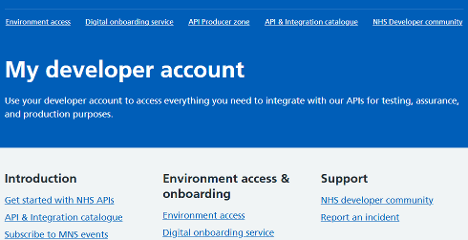
Step 1: In the Developer and integration hub, select 'Create account'.
Step 2: Enter your details and password and select 'Create'.
Step 3: Agree to our terms of use.
Step 4: Verify your email service to activate your account.
Step 5: Sign in to your developer account.
Register your organisation and products
Step 1: In your developer account, select 'Digital onboarding service' from the top menu. Enter the name of your organisation and initial product. Select which APIs you are onboarding to, and then select 'Continue'.

Your organisation and product is displayed in the portal. Add further products as necessary.

Note: If you are an internal NHS England consumer and want to explore a test environment (Confluence), request access using the DOS Access Request form (SharePoint).
Register your environment
You must register your API hosting environment with the NHS at the point of integration. Only use the access key credentials provided in the 'Environment access' section of your developer account. You can complete this process at any time, but your NHS APIs cannot be activated and integrated until you have registered the environment and the API has been approved and assured.
Environments that can be registered are:
-
Sandbox
-
Development
-
Integration test
-
Production
To register your application with an NHS environment:
Step 1: In your developer account, select 'Environment access' from the top menu.
Step 2: Select 'My teams', 'New team' and enter your team name and description. This could be your organisation or a team within your organisation.
Step 3: Select 'My applications' followed by 'Add new application'. The application will enable the access key credentials. Consider if you want to register one application for a product encompassing multiple APIs or multiple applications to register within a product for the APIs.
Step 4: Select the environment type you want to integrate with for this application:
-
Sandbox
-
Development
-
Integration test
-
Production
Select 'Continue'.
Step 5: Select the team you want to add the application to or the team you have just set up.
Step 6: Enter your application name and select 'Continue'.
Step 7: You have the opportunity now to check your answers and make any changes before you create the application. When you have checked your answers, select 'Create application'.
Step 8: Select 'View your new application' to reveal your application details. These details will be requested by an NHS lead at the point of integration, if your API assurance application is approved.
Step 9: Select 'Add APIs' and then choose the APIs you want to connect to upon assurance approval. The selected APIs are likely to be those you are adding to your product. Select 'Continue' and then 'Confirm'.

Step 10: Set up the security credentials of your application for configuration with the NHS platform.
The security credentials you need will vary depending on whether your solution is NHS-hosted or self-hosted. These credentials may include:
- Public key URL
- Callback URL
- JWKS resource URL
- Key ID (KID) for JWKS
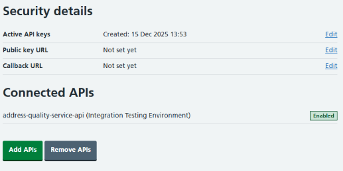
Step 11: The status of your APIs is shown in the 'Connected APIs' section. The NHS onboarding lead will retrieve these details when you're approved to integrate with the NHS API platform. Review how to best utilise these details at: Application-restricted RESTful APIs - signed JWT authentication.
Organisation role types
There are two organisation roles for users of the digital onboarding service:
- Account manager
- Developer
An account manager manages the onboarding process for your organisation. They will:
- create and manage your organisation and products
- add APIs to products
- complete assurance applications
- upload supporting files
- manage users in your organisation
A developer handles the technical aspects of onboarding. They will:
- register your hosting environment
- add APIs to your environment application
- configure security credentials for integration
- manage environment team members
Further information
A guide to managing assurance applications to use NHS England APIs.
A guide to creating or editing a product as part of an assurance application to use NHS England APIs.
A guide to adding, removing and managing users as part of an assurance application to use NHS England APIs.
Last edited: 21 January 2026 3:44 pm