Manage your application
A guide to managing assurance applications to use NHS England APIs.
This guide assumes you have completed the registration process as described in Getting started, and are logged in to your developer account.
Before completing these steps, select your product in 'Digital onboarding service'.
How to use ‘sections’
A ‘section’ is a group of questions. Depending on the APIs you select for your product, you need to complete a series of question sections as part of your application.
The section status shows your progress through the application process.
Notes:
-
When you submit a section, a reviewer and approver is notified about your application.
-
A section can only be submitted when all the questions in the section are completed.
-
You can submit sections singly or complete several at a time.
-
You can save a partly completed section to return to later.
-
The 'Check your eligibility' sections must be completed and approved before further sections can be submitted.

How to complete the questions
Step 1: Select a section and answer the questions presented.
Step 2: Select 'Save' to save as you go or 'Save and close' to return to your product overview.
Step 3: When you save, the section status will change to ‘in progress’.
Step 4: When the section is complete, click 'Submit for review'. You will not be able to submit an incomplete section.
Step 5: Select 'Confirm and submit' to submit your section for review.
About shared sections
Step 1: If a section has been detected in more than one API, it will be presented under the ‘Shared sections’ heading.
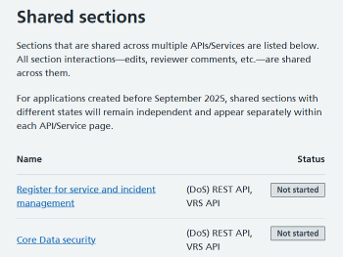
For these sections, you are only required to complete the assurance once for both APIs.
Step 2: When you start assurance for a shared section, the status of both the section and the API will show as 'In progress'.
Step 3: When you have completed all questions within the shared section you will be able to click 'Submit for review'. You will not be able to submit an incomplete section.
Submitting your application
After submitting your sections:
-
The account manager for the product will receive an email notification saying that the section has been submitted for review.
-
NHS England reviewers and approvers will be notified to review the submission and application. You will be notified if further information is required.
-
When all sections in an application are approved, the API approval is complete.
Reopen and update an application
You can reopen and update your application after the API has been approved.
Updating your product information ensures that NHS England can properly support you with integration.
Step 1: Navigate to a previously approved API and section. Read more about sections above.
Step 2: Select 'Update' at the bottom of the screen.
Step 3: Enter a reason for needing to update your application and product information.
Step 4: Confirm you are aware of the impact of updating your application.
If your application used the newest single assessment process, you will need to confirm that by updating your application you are aware that all sections within the API are subject to being updated to the latest question set.
If you are using the ‘legacy flow’ process, you will need to confirm that you are aware of the following 3 effects of updating your application:
-
All sections within this API will be subject to being updated to the latest question set.
-
All APIs in this product will be subject to being updated to the latest question set.
-
API questions may be reopened and service owners must be informed.
Step 5: You can now go back to provide more details.
The section selected can now be updated. Select 'Go back to provide details' to proceed.
Section status will now display ‘Review completed’ instead of ‘Approved’ and you can now change your responses. Follow the steps in How to use 'sections' to complete your resubmission.
Further information
A guide to creating or editing a product as part of an assurance application to use NHS England APIs.
A guide to adding, removing and managing users as part of an assurance application to use NHS England APIs.
This guide shows you how to create a digital onboarding account as part of an assurance application to use NHS England APIs.
Last edited: 16 February 2026 4:01 pm