Manage your users
A guide to adding, removing and managing users as part of an assurance application to use NHS England APIs.
This guide assumes you have completed the registration process as described in Getting started, have added a team, and are logged in to your developer account.
The person who creates an organisation in the onboarding system automatically becomes the team owner. They can add, update and delete team members.
Add a team member
Step 1: Select 'Environment access'.
Step 2: Select 'My teams' followed by the team for which you want to add a member.
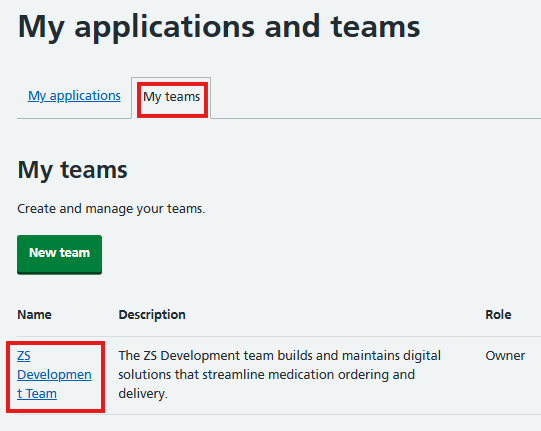
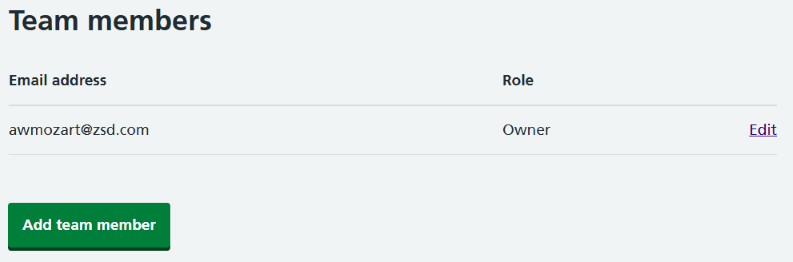
Step 3: Select 'Add team member'.
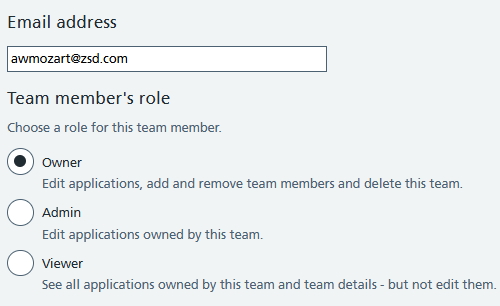
Step 4: Submit the team member's email address. Select the owner, admin or viewer permission you want this team member to have.
Step 5: Confirm your addition.
Delete team member
Step 1: Select 'Environment access'.
Step 2: Select 'My teams' followed by the team for which you want to delete a member.
Step 3: In the team member list, select 'Edit' for the relevant team member.
Step 4: Select 'Delete'.
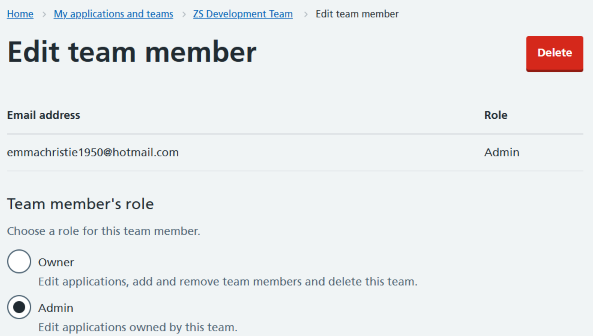
Step 5: Select 'Delete' again to confirm.
Change role
Step 1: Select 'Environment access'.
Step 2: Select 'My teams' followed by the team for which you want to change a role.
Step 3: In the team member list, select 'Edit' for the relevant team member.
Step 4: Select the new role.

Step 5: Select 'Save'.
Further information
This guide shows you how to create a digital onboarding account as part of an assurance application to use NHS England APIs.
A guide to managing assurance applications to use NHS England APIs.
A guide to creating or editing a product as part of an assurance application to use NHS England APIs.
Last edited: 21 January 2026 3:48 pm