Series 10 smartcards
Series 10 smartcards allow the NHS to adhere to modern security standards to help keep patient information safe.
Smartcard Connect is required for all series 10 smartcard management operations, including:
- issue and print
- unlock, certificate renewal and repair (self-service and Registration Authority / local smartcard administrators)
Legacy Identity Agent v2.4.10.0 will support authentication with series 10 smartcards until 28 February 2027, but no other series 10 operations.
Overview
Series 9 smartcards are no longer being manufactured, so we are introducing series 10 smartcards. This will allow us to increase security standards across the NHS estate.
We strongly recommend you update to Smartcard Connect version 4.2. Get the latest version of Smartcard Connect.
Series 8 and 9 smartcards will continue to work, but NHS England will begin sending out only series 10 smartcards when series 9 supplies run out.
Compatibility
| Smartcard version | Works with Identity Agent v2.4.10.0? | Works with Smartcard Connect? |
| Series 8 (Oberthur) | Yes (until 28 February 2027) | Yes |
| Series 9 (Idemia) | Yes (until 28 February 2027) | Yes |
| Series 10 (Idemia) | Authentication only (until 28 February 2027) | Yes |
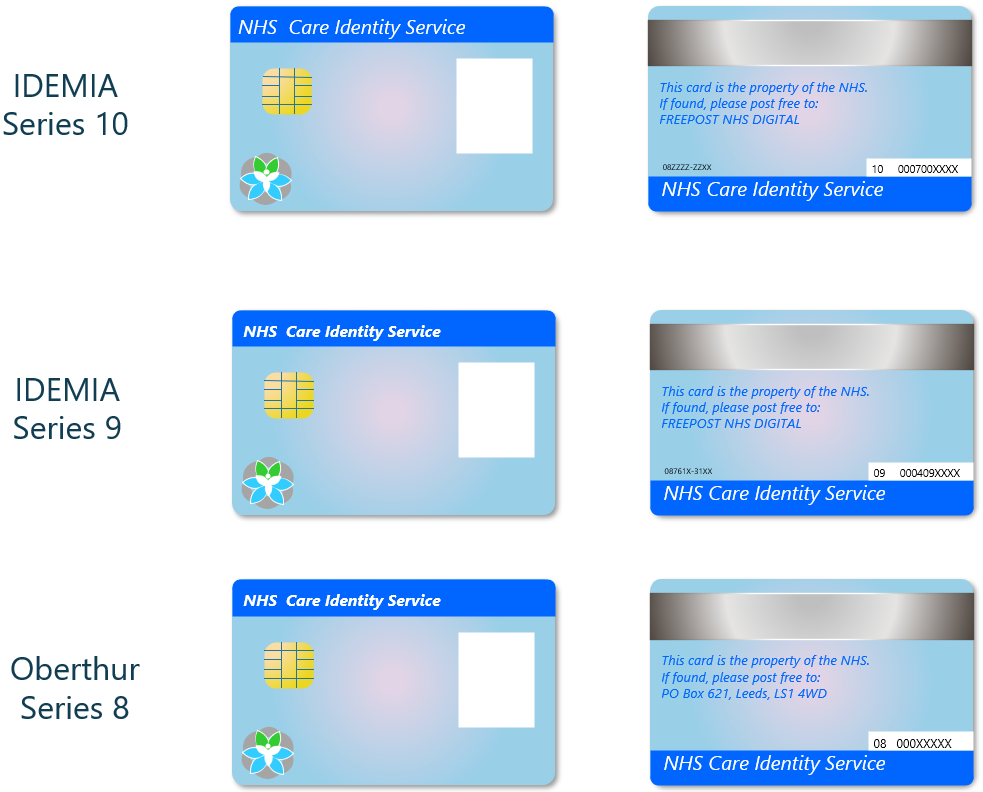
How to identify smartcard versions
This image shows the visual differences between series 8, 9 and 10 smartcards.
Printers and readers
Series 10 smartcards work with:
- the Magicard DoH 300 printer
- the HID Omnikey 3121 and HID Omnikey 5321CR (Contactless) readers
Series 10 timeline
June 2026
- Smartcard Connect version 4.2 released.
May 2026
- Smartcard Connect version 4.1 released.
Summer 2026
- NHS England will begin sending out only series 10 smartcards.
- Ordering smartcards will continue through the existing portal.
February 2027
-
Smartcard Connect will be mandatory for all smartcard authentication and Identity Agent will no longer work.
Smartcard users
Authentication changes with Smartcard Connect
Smartcard Connect authentication is different to what you may be used to with Identity Agent.
Inputting your smartcard into the reader does not generate a pop-up box - you will instead need to enter your PIN when you access a CIS-enabled system.
Removing your smartcard from the reader does not log you out - you'll need to manually log out of an application when you're finished.
You'll need to enter your PIN each time you open a new application.
Self-service applications
Smartcard Connect is required in order to use self-service unlock smartcard self-service certificate renewal on series 10 smartcards. These applications will not work for series 10 smartcards using Identity Agent.
Help for IT teams
See our guidance on how to set up a CIS2 smartcard workstation.
Other authenticators
Other authenticators are available that mean you do not need smartcards in your organisation, or any extra software. Find out more about all our authenticators.
Help with series 10 smartcards
For any issues with or feedback on series 10 smartcards, please complete this form.
Last edited: 25 June 2026 9:56 am