Part of Using RStudio in the NHS England Secure Data Environment
Troubleshooting RStudio Server
When I log into RStudio, I see a grey screen
If you see a grey screen after logging into RStudio Server, this can be due to large amounts of data being restored from .RData upon session start. It is possible to check how large the file is in the Files panel in the bottom right of the RStudio Server session.
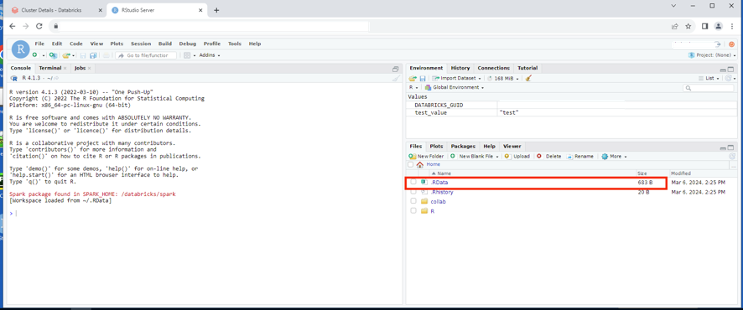
The default setting is for data to be restored from .RData into the workspace on startup. However, this can be changed.
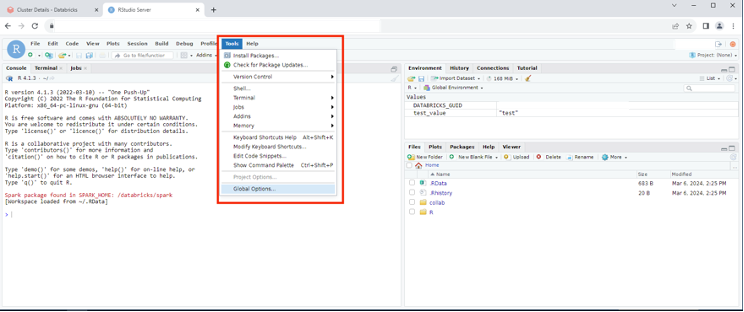
To do so, select Global Options from the Tools menu.
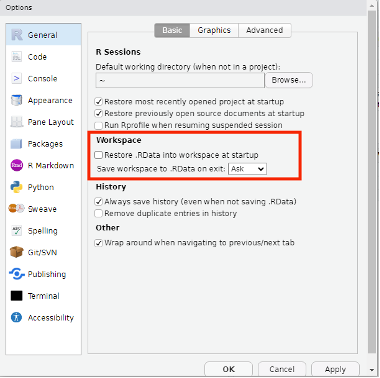
On the Basic tab under the General option, untick the checkbox for Restore .RData into workspace at startup, and click the OK button to save.
Last edited: 12 February 2025 1:47 pm