Bring research data into the NHS England Secure Data Environment
This guide explains the process for bringing a data set into the SDE, how to prepare and upload a participant data (cohort) file, how to prepare and upload a research data set file, what happens to your data set when we receive it and how to update a file.
This feature will be available to customers from May 2026.
This service allows approved researchers to securely bring research data into the NHS England Secure Data Environment (SDE) for linkage and analysis with NHS health and social care data.
This may include a data set collected as part of a study or obtained from other approved sources.
This guide explains:
- the process for bringing a data set into the SDE
- how to prepare and upload a participant data (cohort) file
- how to prepare and upload a research data set file
- what happens to your data set when we receive it
- how to update a file
How this service works
To bring research data into the SDE, this must be agreed as part of your Data Sharing Agreement (DSA). You must also submit a schema file as part of your Data Access Request Service (DARS) application.
This schema file describes the structure of the research data you plan to bring into the SDE.
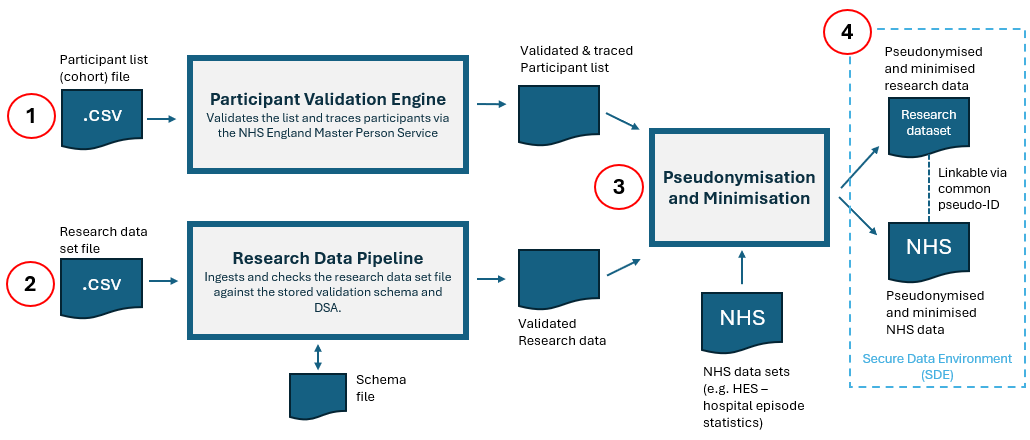
Once your DSA is approved you will need to provide two files which are linked using a common unique reference.
The steps are:
Participant data (cohort file)
Preparing your participant data (cohort file)
You must prepare the file using the guidance for submitting a cohort submission file. This guidance explains how to format the file so it can be uploaded successfully to the Secure Electronic File Transfer (SEFT) service.
Each row in the file must include a ‘UNIQUE_REFERENCE’ (also referred to as ‘Study ID’) for the individual.
Submitting your participant data (cohort file)
Upload the participant data (cohort file) using SEFT.
Once the file has uploaded successfully and passed validation, the person submitting the data will receive a confirmation email. They can then submit the research data set file.
Research data set file
Preparing your research data set file
You must name and format your research data set file correctly so it can be uploaded without delay.
Do not include any personal identifiable information (PII) in the data set.
File name
The file name must include:
- your full NIC number, as shown in your DARS application
- the text string sde_research_data
- underscores (_) to separate each part of the file name
For example: NIC_123456_ A1B2C_sde_research_data.csv.
Format
Your research data set file must:
- be a CSV file (.csv)
- use comma-separated values (not pipe- or tab‑separated)
- be no larger than 3MB
Header row
The data set headers (first row in the csv file) must contain the exact field names listed in the approved schema file.
One of the headers must be UNIQUE_REFERENCE. The values in this field must match those in the submitted participant data (cohort file).
Data rows
You must exclude any personal identifiable information (PII) (for example NHS number, name, or date of birth).
Ensure values entered match to the data type specified in the schema file for the field:
For any date (DateType) fields, ensure the date value is entered as one of the following formats:-
- YYYYMMDD
- YYYY/MM/DD
- YYYY-MM-DD
- YYYY.MM.DD
For any datetime (Timestamptype) fields, ensure value is entered in the following format:
- DD-MM-YYYY HH:MM:SS
Integer types must be whole numbers.
Ensure values do not exceed the maximum field length specified in the schema file for the field.
Only fields marked as Nullable = TRUE are left blank
Submitting your research data set file
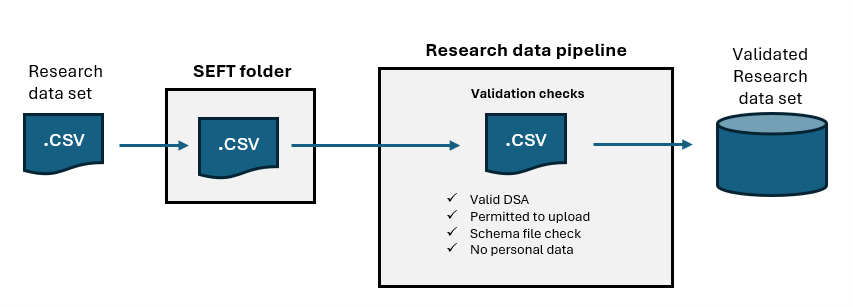
Upload the research data set file using SEFT.
Follow the Secure Electronic File Transfer (SEFT) user's quick help guide for step‑by‑step instructions on logging in and uploading files.
Upload the file to the folder that matches the NIC number of the DSA.
After upload, the file is ingested and processed through the research data processing (RDP) pipeline.
What happens after submission
Following successful processing of your research data set file, we apply the minimisation and pseudonymisation steps set out in the Data Sharing Agreement (DSA).
For the research data set, we:
- apply National Data Opt‑outs, where required by the DSA, to the participant data file. Records for individuals who have exercised an opt‑out are excluded
- pseudonymise the participant data file by replacing the identifier created during tracing with a unique, DSA‑specific token
- minimise the research data set so it only includes records for participants in the final validated, minimised and pseudonymised participant data file
- remove the identifier supplied with the research data and replace it with the DSA‑specific token. This provides an additional level of pseudonymisation while still allowing the research data set to be linked to the NHS England data approved in the DSA
The research data set and NHS data set(s) are then made available in the SDE, linked using this common pseudonymised identifier.
Summary
Here are some quick reminders when preparing your research data set file:
- Ensure the file is a CSV and is 3MB or less.
- Ensure the file name follows the correct naming format.
- Ensure every header matches the field names listed in the approved schema file.
- Ensure one field is named UNIQUE_REFERENCE and that its values match the participant list (cohort file).
- Ensure values match the data type, format, and field length defined in the schema.
- Ensure only fields marked Nullable = TRUE in the schema are left blank.
- Include any personal and/or confidential information.
- Include fields that are not listed in the approved schema.
- Submit partial updates — each submission overwrites the existing research data set.
Updating the participant data or research data set
Updating participant data (cohort file)
The data submitter is responsible for keeping the participant data file accurate and up to date.
To make changes, update the file in your own systems in line with the SEFT guidance on submitting your cohort. This may involve updating metadata for an existing participant, adding a new participant, or deleting an existing participant using the DELETE status.
You must not upload any new or updated research data files until you have received confirmation that the updated participant data file has been accepted.
Submitting new research data
If additional data is collected or generated during your study, you may need to submit a new research data set file.
For example, if your first submission included data from January–March and you later collect data from April–June, you must submit a new file containing all data from January–June.
Any new submission of research data will overwrite the existing research data set held for your DSA.
This means that every time you submit research data, the file must include all previously submitted research data and any new or updated records.
Contact us
If you experience any issues uploading either the participant data (cohort file) or the research data set file, contact the National Service Desk by emailing [email protected] or by phone on 0300 303 5035.
When contacting the Service Desk, please quote:
- ‘PAVE cohort submission issue’ for participant data (cohort file) queries
- ‘SDE Research data issue’ for research data set file queries
Last edited: 13 May 2026 10:09 am