Prepare and upload a schema file for a Data Access Request Service (DARS) application
This guidance explains how to prepare and upload a schema file as part of a Data Access Request Service (DARS) application.
You must provide a schema file as part of your DARS application if you intend to bring research data into the NHS England Secure Data Environment (SDE).
The schema file describes the structure of your data set and helps us understand how it will be linked to NHS data sets and used for analysis within the SDE.
Prepare your schema file
When preparing your file, it is important that it is named and formatted correctly so it can be uploaded without delay.
Name your schema file
The file name must include:
- your full NIC number as shown in your DARS application
- a reference to schema
- underscores (_) to separate each part of the file name
For example: Schema_DARS_NIC_123456_A1B2C_v1.csv
Format your schema file
Your schema file must be:
- a CSV (.csv) flat file
- no larger than 3MB
Use the following format when preparing the file. The schema headers (for example Field Name, Description, Data Type) are fixed and must be used exactly as shown. These headers must not include underscores.
You can download the schema template as an example of how the file should be formatted.
| Schema headers | Description | Content and format guidance | Max field length |
|---|---|---|---|
| Field name | Include all the research data field names that appear as column headers in your research data set file. You must include a field named UNIQUE_REFERENCE (often referred to as ‘Study ID’). |
|
100 characters |
| Description | A short explanation of what each field is and how it will be used. This is required to support review and assurance of the data set. | Provide a clear description and purpose for each field | 1000 characters |
| Data Type | The type of data contained in the field. | Only Databricks SQL data types (used in the SDE) are accepted. Choose the relevant data type from the list of data types you can use | N/A |
| Data Format | Expected format or pattern of the data, for example, a date pattern or a code structure. |
Formats apply only to DateType and TimestampType values Use N/A to show that no format applies
Accepted timestamp format:
Accepted Decimaltype format:
|
|
| Field length | The maximum number of letters or numbers the field can contain. | The value entered must be a whole number. Decimal values will be rejected | N/A |
| Nullable | Describes if the field can be left blank. | Use TRUE if the field can be left blank or FALSE if the field must always contain a value | N/A |
Data types you can use
The NHS England Secure Data Environment (SDE) uses Databricks to process and analyse data. For this reason, you must use only the data types below.
| Accepted data types | Definition | When to use this data type | Example values |
|---|---|---|---|
| BooleanType | A logical value representing true or false | When this field can only ever have 2 values and represents a yes/no or true/false condition | true, false |
| DateType | A calendar date (year, month, day) | When you need to store a date only and time of day is not relevant | 2026-12-01 |
| DecimalType | A numeric data type which must have fixed precision (the maximum total number of digits) and scale (the number of digits after the decimal place) | For numbers where exact precision is critical, that is, not close enough but correct down to the digit. When you use DecimalType, you’ll need to define the precision (maximum number of digits) and scale (number of digits on the right of the decimal point). For example (5, 2) can support -999.99 to 999.99 |
For (5, 2): 567.34 Maximum precision is 38. Scale must be less than or equal to precision. It can be set to 0 |
| DoubleType | A double-precision (64-bit) floating-point number | For decimal numbers where greater accuracy is needed. DoubleType will store up to 15 digits | 3.1415926535897 |
| FloatType | A single-precision (32-bit) floating-point number | For decimal numbers where your total digit count does not exceed 7 | 1.532 |
| IntegerType | A 32-bit signed whole number | For whole numbers when values are expected to stay within standard integer limits approximately ±2 billion | 42 |
| LongType | A 64-bit signed whole number | For whole numbers that may exceed IntegerType limits | 92233720368547758 |
| StringType | A sequence of characters (text) | For text or identifiers such as IDs or codes, even if they contain only numbers | Hello world, ID_329423 |
| TimestampType | A date and time value (timestamp), typically down to seconds or microseconds | For a specific date and time | 16-04-2026 14:30:00 |
Example schema file and matching research data set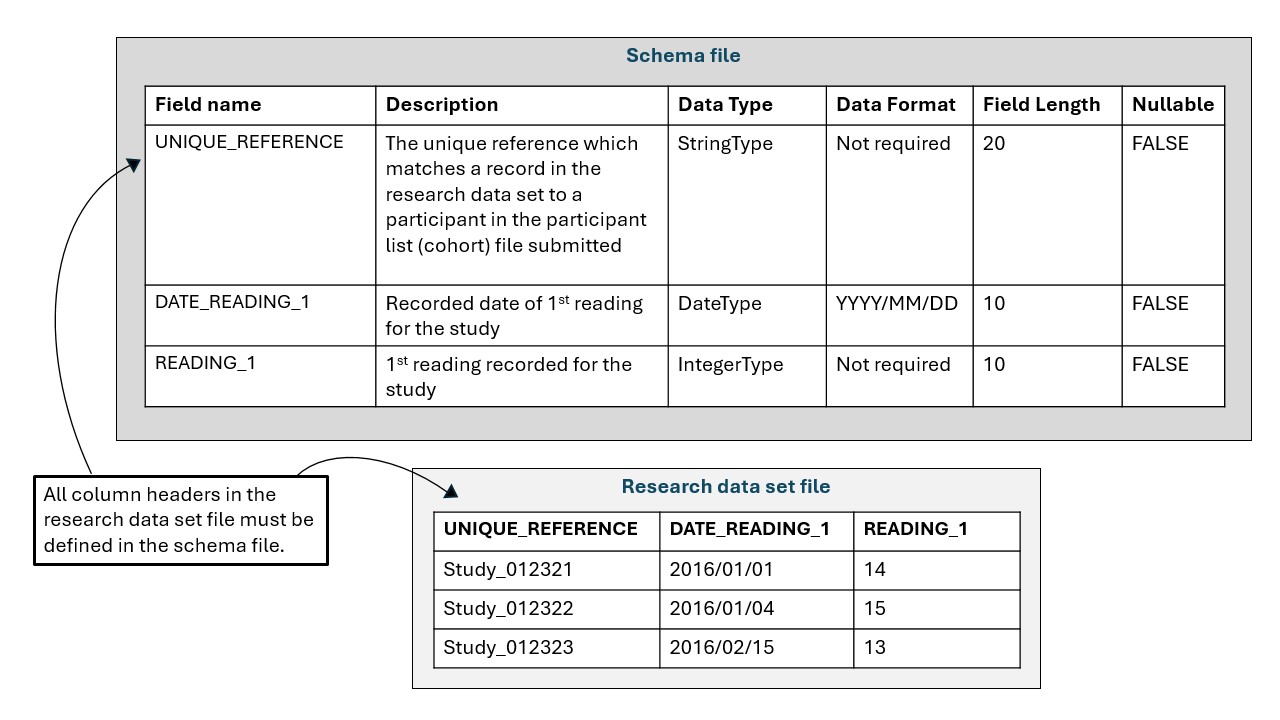
Upload your schema file in DARS online
Follow the steps below to upload your schema file:
- Log in to DARS online.
- Go to list of uploaded documents.
- On the uploading documents page, select yes, then select continue.
- From the dropdown menu select schema then continue.
- Provide a short description and choose the correct file.
- Select upload and continue.
The file should appear in the list of documents if it has been uploaded correctly.
What happens after submission
Once you submit your schema file, we will review it alongside your DARS application and contact you if anything needs to be amended.
During the data application process, you will need to tell us who will submit the participant data (cohort file) and the research data set file. Once your application is approved, the person submitting the data will receive separate guidance on how to access the Secure Electronic File Transfer (SEFT) to upload the files.
You can check the status of your application in DARS online.
Details of the full process for preparing and uploading the files are available in the guidance on bringing research data into the NHS England Secure Data Environment (SDE).
Summary
Here are some quick reminders when preparing the schema file.
- Ensure the file is a CSV and is 3MB or less
- Ensure the file name follows the correct naming format
- Ensure that the schema does not contain any record level or participant data
- Include a field named UNIQUE_REFERENCE that matches the field used in the participant list (cohort file) and the research data set
- Check that every field in your research data set is listed in the schema
- Ensure that field names and schema headers are formatted correctly
- Ensure that only accepted data types are used
- Ensure only fields marked Nullable = TRUE are left blank
- Include any personal and/or confidential information in your data
Contact us
If you need any support with your request for data, contact us on 0300 303 5678, or email [email protected].
Last edited: 7 May 2026 11:51 am