EPS Prescription Tracker
The Electronic Prescription Service (EPS) Prescription Tracker allows staff working at prescribing and dispensing sites to check the status of a prescription.
This guidance is about the EPS Prescription Tracker that is well-established across prescribing and dispensing sites. We are working on a new service, called the Prescription Tracker, which is being tested with a small number of community pharmacies. This will be made more widely available in 2026.
About the EPS Prescription Tracker
The Electronic Prescription Service (EPS) Prescription Tracker allows prescribers and dispensers to check the status and location of a prescription.
When searching for a prescription, enter the prescription ID if available (you may be able to copy and paste from the prescribing system), or use the option to search by NHS number and date range.
The EPS Prescription Tracker uses Care Identity Service with authenticator assurance level 3 (AAL3).
The new Prescription Tracker
The new Prescription Tracker has been designed and developed with users. It is currently being piloted with a small number of dispensing sites and will be made available to more sites and in 2026.
With the new Prescription Tracker, a user will be able to search for prescriptions using prescription ID, a patient’s NHS number or a patient’s demographic details. It will also show medication details, greatly improving the user and patient experience.
Normal operation mode
The EPS Prescription Tracker allows you to search for an EPS prescription and check its status. In normal operation mode, the search screen has the option to search using a prescription ID, or a date range and a patient's NHS number.
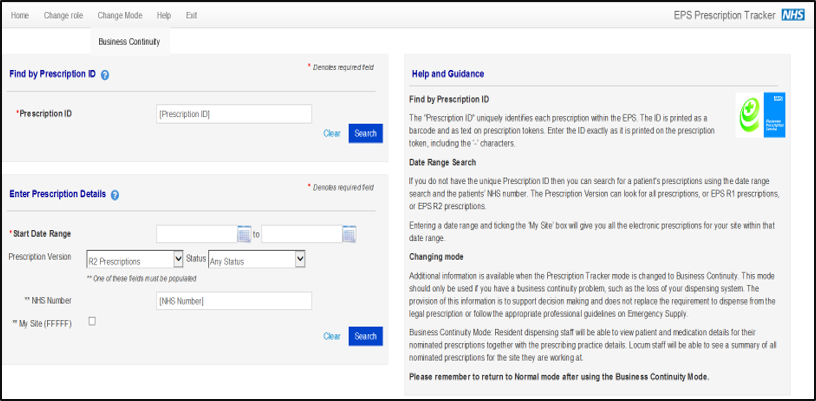
Use the prescription ID search by entering or copying and pasting the prescription ID from the clinical system or prescription token.
Use the date range search and enter the NHS number for a single patient search. Tick the 'my site' box to limit the search to show prescriptions for your site only.
Business continuity mode
The EPS Prescription Tracker’s business continuity mode allows community pharmacy users to view prescription information, such as medication details. This can be used to aid clinical decision making when the pharmacy dispensing system is not available, but the pharmacy still has a Health and Social Care Network connection.
Business continuity mode should only be used when the site is in a real business continuity situation. Access business continuity mode by selecting ‘Change mode’ in the header of the EPS Prescription Tracker. This will give the user access to:
- a locum 'find a site' feature
- enhanced level of information on patient, organisation and prescription details
- a 'search for a patient' feature, which can be used to find an NHS number
Some of this functionality is not available to locum users.
When a user enters business continuity mode, they must accept a disclaimer that confirms personal responsibility for the processing of patient data. For data security, a Spine alert is sent to the site’s governance person each time a user enters business continuity mode.
Roles with access to the EPS Prescription Tracker
All users that need access to the tool must have one of the following role-based access control (RBAC) codes included in their user profile:
- B0278 'Perform Prescription Preparation'
- B0570 'Perform Pharmacy Activities'
- prescribing system supplier organisations – have B0278 added to their user profile
- dispensing system supplier organisations – have B0570 added to their user profile
- NHS area team or ICS organisations – have B0570 added to their user profile
If you do not have access to the EPS Prescription Tracker and you think you should, contact your Registration Authority sponsor.
Contact us
You can contact the EPS team using our enquiry form. You can also contact dedicated teams, depending on your enquiry:
| Enquiry | Point of contact |
|---|---|
| EPS implementation queries (for NHS organisations) and any other queries | Digital Medicines Programme Email: [email protected] |
| EPS onboarding enquiries | EPS Onboarding and Assurance team Email: [email protected] |
| EPS support enquiries (live services) | EPS Live Service Management Team Email: [email protected] |
Last edited: 18 February 2026 1:40 pm