Functions of access and store digital patient documents
The National Document Repository (NDR) Access and store digital patient documents service stores digital Lloyd George records. A Lloyd George record can contain the following documents:
- scanned paper notes
- electronic health record (EHR) notes
- electronic health record (EHR) attachments
- other letters and documents for a patient
The service allows you to:
- search for a patient record
- view a patient record
- upload, download and remove documents in a Lloyd George record
- remove a patient record
- add files to scanned paper notes
- review and action pending patient documents
- reassign pages in scanned paper notes to the correct patient
- view version history and restore to a previous version for scanned paper notes
- restrict staff access to patient records
- download a report of the Lloyd George records stored in the service for their organisation
This section gives information about each function and solutions to problems you might have.
Search for a patient
This function can be used by admin and clinical users
Using a patient’s NHS number, this function will search the NDR database and locate the patient’s Lloyd George record if it is stored in the NDR.
Enter the patient’s NHS number into the search field to find the patient’s record. You might use this function to:
-
check if a patient’s Lloyd George record is in the NDR
-
find a patient’s Lloyd George record so that you can carry out a task
Errors when searching for a patient
You may see these error messages when entering NHS numbers in the Search for a patient page:
If you enter an NHS number which is not found in the Personal Demographics Service (PDS), you will see this message.
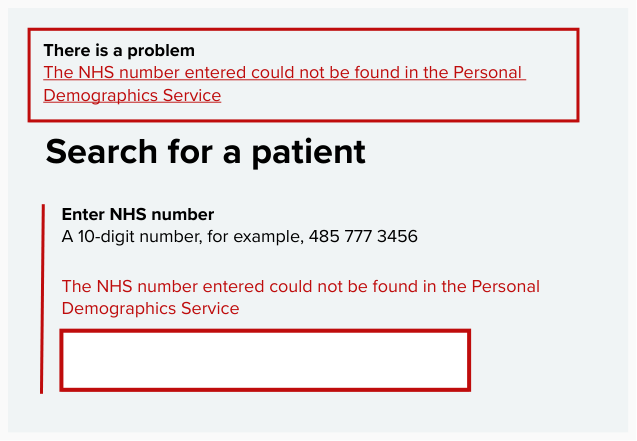
This could be because events such as adoption have meant the patient’s NHS number has been changed. First, check you have entered the NHS number correctly. If you still get this message, contact the National Service Desk on [email protected] or 0300 303 5035.
If you enter the NHS number of a patient who is not registered at your practice, you will see this error message.
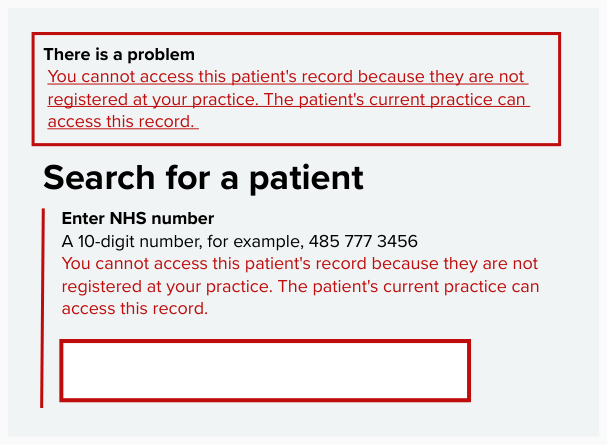
You can only view the records of patients registered at your practice. The patient’s current practice will be able to access their record.
View a patient record and search for typed information within it
This function can be used by admin and clinical users.
You can view any PDF document stored in a Lloyd George record for a patient registered at your practice.
You might use this function to:
-
check a patient’s Lloyd George record is stored in the NDR
-
find medical information in a patient’s Lloyd George record, for example, vaccinations or allergies
The search function will only search typed text. It will not search and return results for:
- handwritten notes or text on charts
- pages that do not have optical character recognition (OCR)
The search function will only search typed text. It will not search and return results for:
- handwritten notes or text on charts within a patient’s record
- pages within a record that do not have optical character recognition (OCR)
Some pages in PDF documents have optical character recognition (OCR) and can be searched. Other pages have not. Handwritten notes cannot be detected by OCR. This means search results may not include all the information you need. You should not rely on search to find everything in a document.
You cannot view documents which are not PDFs in the service. You will need to download these to view them.
Patient names within the NDR
When documents are transferred into the NDR, we will validate them by matching the filename with the patient’s current and historical names on the Personal Demographics Service (PDS).
When you search for a patient’s record in the NDR using an NHS number, it shows the record with the patient’s most recent name.
If you download the scanned paper notes, the name used in the record’s filename is the patient’s name at the time of the record being scanned. The record may also contain previous names.
Changes to a patient’s name will not impact your ability to find the patient’s record. You won't be able to change their name on the record within the NDR.
Errors and messages in the Lloyd George records page
1. You may see the message record does not exist if there is a problem returning and displaying the record. You can try reloading the page or downloading the record. If you are still having problems, contact the service team by emailing [email protected].
2. If there are no documents stored in a patient's Lloyd George record, you will see the message 'There are no documents available for this patient' in their record.
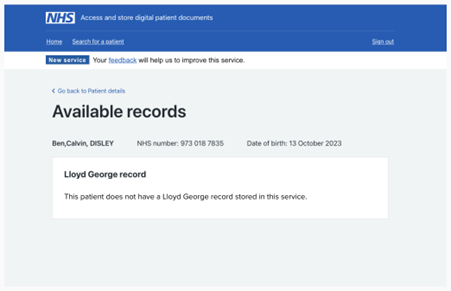
This could be because:
-
the patient does not have Lloyd George record
-
their Lloyd George record has not been scanned and transferred into the service yet
Download a document
Admin users can use this function.
This function allows you to download documents from a patient’s Lloyd George record to your computer. It will save the files in your downloads folder.
You might use this function to securely share a patient’s Lloyd George record with a clinician or a third party, such as a solicitor as part of an information request. You will also need to download documents to redact them.
You do not need to download Lloyd George scanned paper notes from this service or attach them to a patient's electronic health record (EHR). Scanned paper notes can stay in the service and you can view them when you need to. Some clinical systems let you upload scanned a paper notes to a patient's EHR. If you do this, do not remove the scanned paper notes from this service.
You will need to download EHR notes and attachments, and other patient documents to summarise and upload them onto the clinical system.
Make sure you remove the digital files from your computer when you have finished.
How to use the download function
Scanned paper notes download as single PDF file.
If you can’t download a document, you can try reloading the page or downloading it again. If you're still having problems, contact the service team: [email protected].
Remove a document
This function allows you to remove documents from a patient’s Lloyd George record from the NDR. You can only remove whole documents, for example, the patient's entire scanned paper notes, not pages within it.
Admin users can use this function.
You might use this function to remove a patient record from the service once the data retention period for that record has passed.
Accidental removal of a document
There are safeguards in place within the service to prevent you from accidentally removing a document from a patient’s Lloyd George record. These include warnings which advise you on the circumstances under which you can remove documents and a final confirmation page.
When you remove a document, it is held in back-up storage for 8 weeks and can be restored to the service during that time if needed. You can contact the service team at [email protected] to restore a removed document.
Remove selected pages from a record
You can remove individual pages from scanned paper notes if they are incorrect. If you find pages for a different patient within scanned paper notes, you can reassign them to the correct patient. See Reassign pages in scanned paper notes to learn how to do this.
Last edited: 18 March 2026 8:54 am