Overview
The National Disease Registration Service (NDRS) has worked with NHS trust providers to produce an excel data view template to assist with the data collection for the COSD dataset. For users whose trust cancer management software is not Somerset Cancer Registry based the ‘other systems’ data view template is available. This template is designed to give an overview of data completeness on a per-patient-per-tumour level. The completeness statistics within the document are to be considered as a guide. The 2026 COSD template once setup will involve data related to any time period selected in the SQL query below, however we advise reviewing data in either monthly/quarterly or annual selections.
Functionality
The dataview template requires a SQL query to be wrote to allow extraction of data that can be inserted into the template document.
Pre-setup requirement
The relevant member of your trust team will need to setup a SQL query with your trust cancer management system. The query must extract the below COSD data items in this sequence:
- Local Hospital Number
- NHS Number
- Site code First Seen
- Primary Diagnosis ICD10 Code
- Date of Diagnosis
- Site code/Organisation of Diagnosis
- Laterality
- Basis of Diagnosis
- Morphology (SNOMED) Diagnosis
- Morphology (ICD03)
- Pre-Treatment T-Stage
- Pre-Treatment N-Stage
- Pre-Treatment M-Stage
- Organisation of stage (pre-treatment)
- Date of Stage (Pre-Treatment)
- Integrated (Final) T-Stage
- Integrated (Final) N-Stage
- Integrated (Final) M-Stage
- Organisation of Stage (Int. Stage)
- Date of stage (Int. Stage)
- FIGO Stage
- Ann Arbor Stage
- Binet Stage
- R-ISS Stage
- MDT Team meeting discussion Type
- Performance Status
- CNS Indication Code
Our advice is to setup the SQL query looking at Primary diagnosis ICD10 code being like ‘C%’ and also the ‘date of diagnosis’ having parameters set either in monthly, quarterly or annual statements e.g. 01/01/2026 – 31/12/2026.
Using the Dataview template
Once the AQL query has been setup and ran, open the downloaded ‘00R – Other systems COSD’ data view. The AQL Query should return the data into an excel format and it should be copied in totality (Ctrl + C). Within the data view tool navigate to the yellow tab titled ‘data dump’. The data should be pasted into here from cell A2:
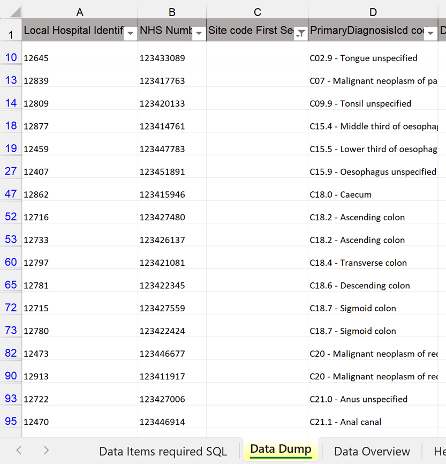
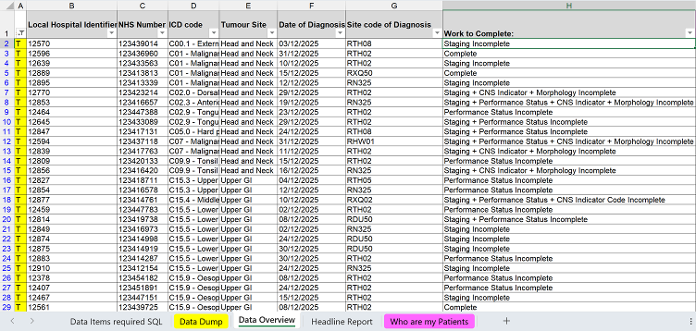
The data will then be available in the ‘Data Overview’ tab. This will give a summary of patient demographics that can be filtered by criteria such as date/tumour site & in column H will give a summary of what applicable data is required to be recorded.
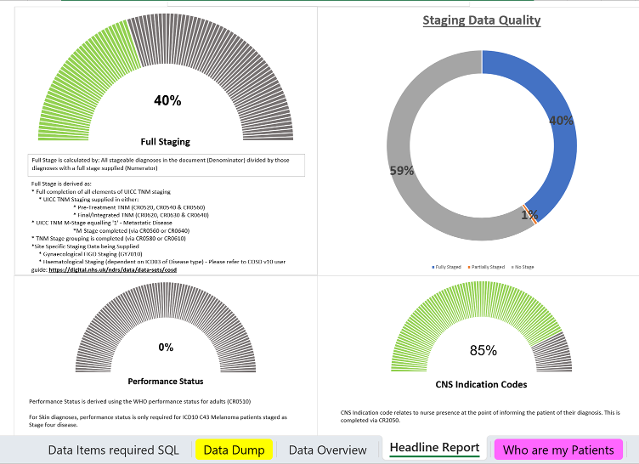
Within the ‘Headline Report’ tab is an overview of Key COSD Data items looking at completeness:
The ‘Who are my patients’ tab is a series of 5 pivot tables aligning to those key data items. On initial setup the pivot tables will need the correct options selecting to correctly display your data. The filter options are required to match the criteria listed for data to be displayed correctly:
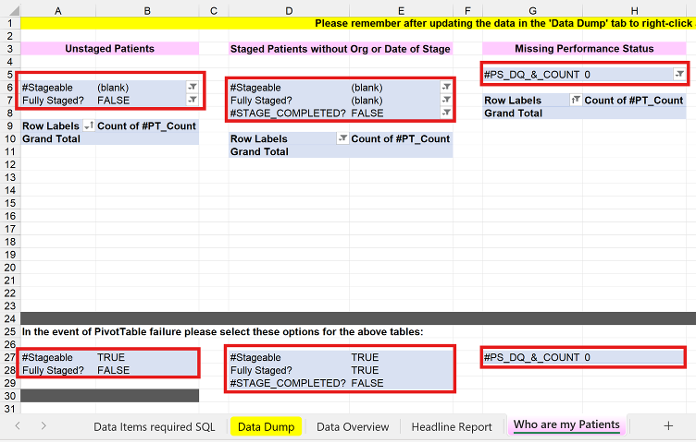
Once setup each pivot table will give you patient-level details of who the patients are with missing data. To discover this level of information navigate to the appropriate pivot table within the ‘Who are my patients’ tab and double-click the number (either the ‘Total’ field or the number next to the appropriate speciality):
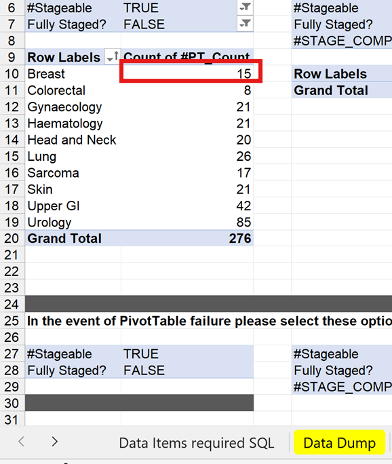
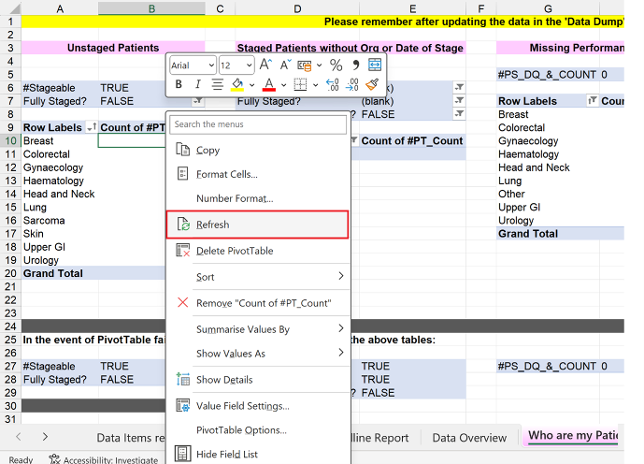
Following every refresh of data it is advised that all pivot tables are also refreshed via navigating to each one and ‘right-clicking’ selecting ‘Refresh’ over each table:
Last edited: 30 June 2026 9:28 am
