Import research data - user guide
This service allows approved researchers to securely import research data into the NHS England Secure Data Environment (SDE) for linkage and analysis with NHS health and social care data.
For an overview of the service, see Importing research data into the NHS England Secure Data Environment (SDE).
This detailed guidance explains:
- the process for importing a research data set into the SDE
- how to prepare and upload a participant data (cohort) file
- how to prepare and upload a research data set file
- what happens to your data set when we receive it
- how to update a file
How this service works
To import research data into the SDE, this must be agreed as part of your Data Sharing Agreement (DSA). For each research data set file you will import, you must submit a schema file as part of your Data Access Request Service (DARS) application.
Each schema file describes the structure of a particular research data set you plan to bring into the SDE.
Once your DSA is approved you will need to upload the participant data (cohort) file and research data set files, which are linked using a common unique reference, following the steps below.
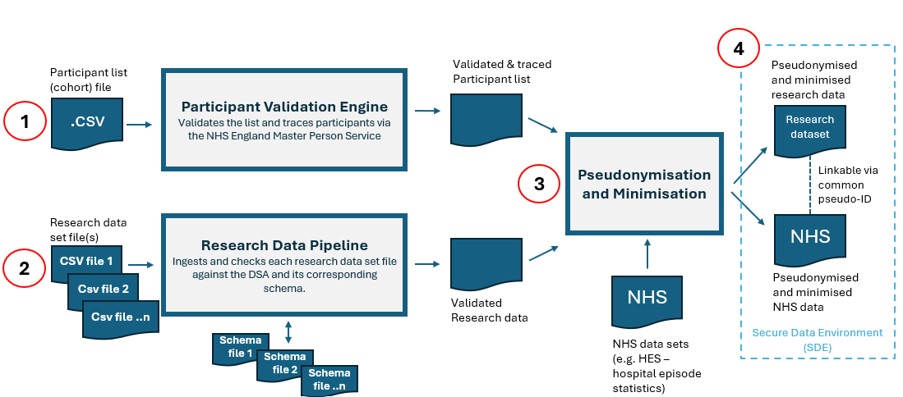
1. Prepare and submit the participant data (cohort) file
This file contains identifiers for the individuals in the study (for example, NHS number and date of birth). It is used to identify and trace participants to NHS records.
During the DARS application, you will be asked to confirm who will submit the file.
The submitter will receive an email with instructions on how to access the Secure Electronic File Transfer (SEFT) service to submit the files.
How to prepare your participant data (cohort file)
You must prepare the file using the guidance for submitting a cohort submission file. This guidance explains how to format the file so it can be uploaded successfully to the SEFT service.
Each row in the file must include a ‘UNIQUE_REFERENCE’ (also referred to as ‘Study ID’) for the individual.
How to submit your participant data (cohort file)
Upload the participant data (cohort file) using SEFT.
Once the file has uploaded successfully and passed validation, the person submitting the data will receive a confirmation email. They can then submit the research data set file.
2. Prepare and submit the research data set file
A research data set file contains record-level data collected or generated about the same participants as listed in the participant data (cohort) file. You can submit multiple research datasets under the same DSA. Each dataset must have a corresponding schema submitted as part of the DSA process.
After the participant data (cohort) file has been successfully uploaded and validated, the data submitter uploads the research data set files using the SEFT guidance.
How to prepare your research data set file
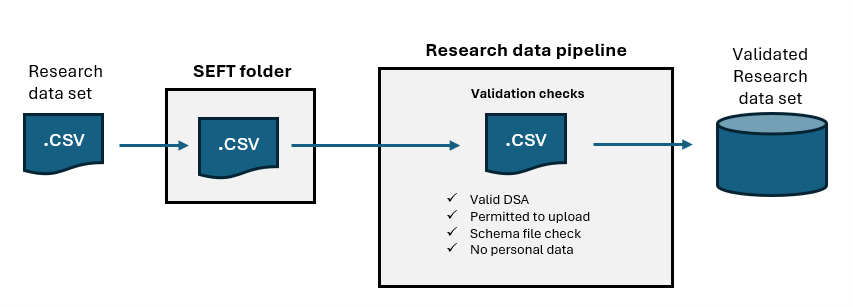
You must name and format each research data set file correctly to avoid delays.
You must name and format your research data set file correctly so it can be uploaded without delay.
Do not include any personal identifiable information (PII) in the data set.
File name
The file name must include:
- your full NIC number, as shown in your DARS application
- the text string sde_research_data
- a double underscore followed by the reference provided with the corresponding schema in your DARS application
For example: NIC_123456_A1B2C_sde_research_data__studyresults.csv.
Format
Your research data set file must:
- be a CSV file (.csv)
- use comma-separated values (not pipe- or tab‑separated)
Header row
The data set headers (first row in the csv file) must contain the exact field names listed in the approved schema file.
One of the headers must be UNIQUE_REFERENCE. The values in this field must match those in the submitted participant data (cohort file).
Each participant’s UNIQUE_REFERENCE must appear only once within a research dataset file.
Any rows which contain a unique reference which do not have a match in the participant data (cohort) file will not be included in the final presented dataset.
Data rows
You must exclude any personal identifiable information (PII) (for example NHS number, name, or date of birth).
Ensure values entered match to the data type specified in the schema file for the field.
For any date (DateType) fields, ensure the date value is entered as one of the following formats:
- YYYYMMDD
- YYYY/MM/DD
- YYYY-MM-DD
- YYYY.MM.DD
Enter values in date and time (TimestampType) fields using one of the allowed DateType formats followed by a space and a 24-hour time (HH:MM:SS). For example:
- YYYY-MM-DD HH:MM:SS
Integer types must be whole numbers.
Ensure values do not exceed the maximum field length specified in the schema file for the field.
Leave a field blank only if it is marked Nullable = TRUE in the schema file.
How to submit your research data set files
Upload the research data set file using SEFT.
Follow the SEFT user's quick help guide for step by step instructions on logging in and uploading files.
Upload each file to the folder that matches the DSA's NIC number.
After upload, we process each file through the research data processing (RDP) pipeline.
Any records in the research data file with no corresponding ‘match’ (via the UNIQUE_REFERENCE field) will not be progressed through to the next stage.
3. Pseudonymisation and minimisation
Once both files have been received and validated, we process the data in line with the DSA. We:
- pseudonymise the participant data by replacing the person identifier derived during the tracing process in step 1 with a pseudonymised person identifier
- minimise the research data in line with the participant data and any additional requirements set out in the DSA
- replace the unique reference in the research data set with the pseudonymised person identifier
- retrieve, minimise, and pseudonymise the relevant NHS data set(s) (as defined in the DSA) for the same participants
4. Make the data available in the SDE
When processing is complete, the approved NHS data sets and research data sets are made available in the SDE. Each research dataset appears as a separate Delta table within the schema in your agreement’s Databricks catalog. The datasets can be linked using the common pseudonymised person identifier.
Summary
Here are some quick reminders when preparing your research data set file:
- Ensure the file is a CSV and is 3MB or less.
- Use the correct file naming format, including the research data set reference that links the file to its schema.
- Ensure every header matches the field names listed in the approved schema file.
- Ensure one field is named UNIQUE_REFERENCE and that its values match the participant list (cohort file).
- Ensure values match the data type, format, and field length defined in the schema.
- Ensure only fields marked Nullable = TRUE in the schema are left blank.
- Include any personal and/or confidential information.
- Include fields that are not listed in the approved schema.
- Submit partial updates — each submission overwrites the existing research data set.
Updating the participant data or research data set
Updating participant data (cohort file)
The data submitter is responsible for keeping the participant data file accurate and up to date.
To make changes, update the file in your own systems in line with the SEFT guidance on submitting your cohort. This may involve updating metadata for an existing participant, adding a new participant, or deleting an existing participant using the DELETE status.
You must not upload any new or updated research data files until you have received confirmation that the updated participant data file has been accepted.
Submitting new research data
If additional data is collected or generated during your study, you may need to submit a new research data set file.
For example, if your first submission included data from January–March and you later collect data from April–June, you must submit a new file containing all data from January–June.
To update an existing research dataset, upload a complete replacement file using the same research dataset reference. Include all records you want to retain. Once successfully processed, the new file replaces the existing data for that reference; it does not append records.
This means that every time you submit research data, the file must include all previously submitted research data and any new or updated records.
Other research datasets under the same DSA are unaffected.
Contact us
If you experience any issues uploading either the participant data (cohort file) or the research data set file, contact the National Service Desk by emailing [email protected] or by phone on 0300 303 5035.
When contacting the Service Desk, please quote:
- ‘PAVE cohort submission issue’ for participant data (cohort file) queries
- ‘SDE Research data issue’ for research data set file queries
Last edited: 22 October 2026 2:31 pm