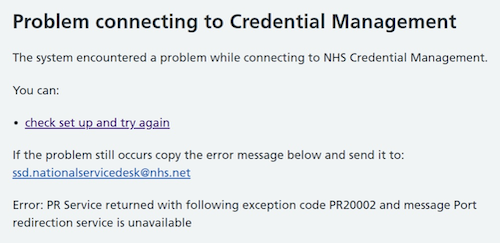
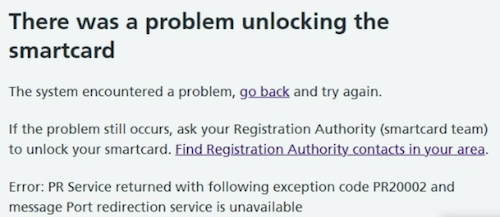
Accessing a Care Identity Service application over the internet
New and updated Care Identity Service applications are available over the internet. If you're using a smartcard, the workstation must also have NHS Credential Management installed and running.
If you are seeing this error, it is most likely because your workstation or network has not been set up to run the newer services.
It causes a clinical risk, when healthcare staff do not have access to patient data. Therefore it's important to fix this across all your organisation's workstations as a priority.
Step 1 (critical step)
Users must be able to access certain domains to be able to use Care Identity applications and services.
To find out how to configure this access, read our guidance on allowing domains and using proxies or VPNs.
Step 2
Check for the NHS Chrome extension. This is no longer supported. If it is running - even on a supported browser - it will allow the user to access the service but they will not be able manage smartcards, including unlocking, issuing or printing smartcards and renewing certificates.
Step 3
Check the workstation has NHS Credential Management installed and running.
Step 4
Download the NHS England Diagnostic Tool and generate a diagnostic log for the workstation.
The Diagnostic Tool should be the first resort for all Care Identity Service troubleshooting on a user's machine, where the cause is unclear. The vast majority of reported problems can be diagnosed and fixed using this. You will need local machine admin access to run the tool and complete any fixes that it highlights.
Step 5
If you have been through all the steps above but still cannot progress, you should raise a case to the National Service Desk on the NHS Digital Customer Portal or email [email protected]
To get the best service, follow these instructions when writing your support request:
Short description Error: PR Service PR20002 Port redirection service is unavailable
Long description
I am a member of the IT team for my organisation.
A user is trying to [action they are trying to do e.g. print smartcard]
They get the following error:
Error: PR Service PR20002 Port redirection service is unavailable
-
I have followed the troubleshooting steps as described here: https://digital.nhs.uk/services/care-identity-service/setting-up-and-troubleshooting/common-issues/error-pr-service-pr20002-port-redirection-service-is-unavailable
-
I attach a copy of the diagnostic log for the workstation(s)
-
I confirm that the workstation conforms to the Warrantied Environment Specification
-
This affects X number of users
-
The Error Response ID is [add ID - only include this if the Error Response ID is shown on the error page]
Reissuing smartcards
If either card is faulty, you should generate a diagnostic log and report this error to the National Service Desk before you issue a new smartcard. Issuing a new smartcard should be the last resort.