
Error: INF1014: Scanning for Smartcard ERR5022

Find out what to do if you get the error "Error: INF1014: Scanning for Smartcard ERR5022: Operation cannot be completed"

The issue

You are trying to:

  • issue or print a smartcard
  • reset a smartcard passcode
  • renew a smartcard certificate

This could be either for yourself or for a user, but you see this error:

Error: INF1014: Scanning for Smartcard ERR5022: Operation cannot be completed
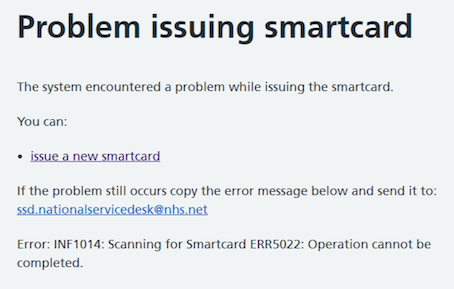
Error message screenshot

This error may be intermittent, or it may happen every time.


Cause

Your workstation has incorrect smartcard reader drivers installed.


What to do: clinical smartcard users

Report this issue to your local IT team

If you're a clinical user trying to access live patient data, you will need to get IT support. Depending on your organisation, this may be through your IT helpdesk, or via a dedicated Registration Authority team. As each organisation is set up differently, we cannot provide contact details that work for everyone. Check your intranet for links to an IT helpdesk, Registration Authority or smartcard team. 

Copy and paste this text into your support request:

Smartcard error

When servicing a smartcard I get the following error:

Error: INF1014: Scanning for Smartcard ERR5022: Operation cannot be completed

I need to raise a request for help as described in https://digital.nhs.uk/services/care-identity-service/setting-up-and-troubleshooting/common-issues/error-inf1014


What to do: Registration Authority and IT teams

Certificate renewal and smartcard repair or printing issues

This is an intermittent error that can happen when carrying out any smartcard management. It may stop happening without intervention.

It is caused by incorrect smartcard reader drivers.

It causes a clinical risk, when healthcare staff do not have access to patient data. Therefore it is important to fix this across all your organisation's workstations as a priority.

Step 1 (critical step)

Check the workstation has the correct smartcard reader drivers installed.

Step 2

Use the setup checker tool to get a snapshot of common problems.

Step 3

Download the NHS England Diagnostic Tool and generate a diagnostic log for the workstation.

The Diagnostic Tool should be the first resort for all Care Identity Service troubleshooting on a user's machine, where the cause is unclear. The vast majority of reported problems can be diagnosed and fixed using this. You will need local machine admin access to run the tool and complete any fixes that it highlights.

Step 4

If you have been through all the steps above but still cannot progress, you should raise a case to the National Service Desk on the NHS Digital Customer Portal or email [email protected]

To get the best service, follow these instructions when writing your support request:

Short description Error: INF1014:Scanning for Smartcard ERR5022: Operation cannot be completed

Long description

I am a member of the IT team for my organisation.

A user is trying to [action they are trying to do e.g. print smartcard]

They get the following error:

Error: INF1014:Scanning for Smartcard ERR5022: Operation cannot be completed

  • I have followed the troubleshooting steps as described here: https://digital.nhs.uk/services/care-identity-service/setting-up-and-troubleshooting/common-issues/error-inf1014

  • I attach a copy of the diagnostic log for the workstation(s)

  • I confirm that the workstation conforms to the Warrantied Environment Specification

  • This affects X number of users

  • The Error Response ID is [add ID - only include this if the Error Response ID is shown on the error page]

Reissuing smartcards

If either card is faulty, you should generate a diagnostic log and report this error to the National Service Desk before you issue a new smartcard. Issuing a new smartcard should be the last resort.

Last edited: 28 October 2025 1:28 pm