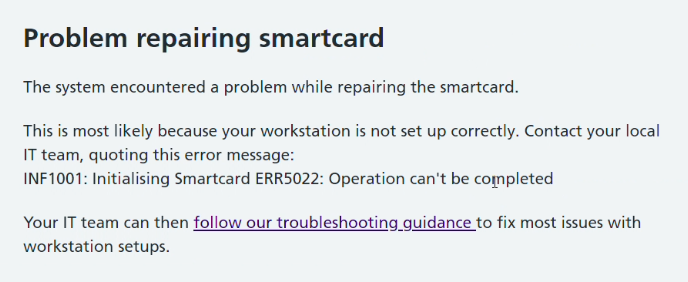
Workaround 1
Access smartcard management options via the user's profile page, rather than directly from the Care Identity Management home page.
To use this workaround:
- log in to Care Identity Management
- go to 'Find user'
- search for and select the profile of the user whose smartcard you are trying to repair
- on their profile page, scroll down and select the 'Authenticators' tab
- select 'Service' next to the smartcard you are trying to repair
- choose 'Repair smartcard certificates'
The smartcard should then repair as normal.
Workaround 2
If you unlock the smartcard first, you should then be able to repair the certificates.
Note: this workaround requires the smartcard to be given a new 6-8 digit passcode.
To use this workaround:
- log in to Care Identity Management
- access smartcard management options via either the user's profile (see above) or via to 'Service smartcard' on the Care Identity Management home page
- choose 'Unlock smartcard'
- connect the target smartcard to a second smartcard reader
- enter a new passcode and select 'Confirm'
- return to the service smartcard options and choose 'Repair smartcard certificates'
The smartcard certificates should now repair successfully.
NHS England Diagnostic Tool
Download the NHS England Diagnostic Tool and generate a diagnostic log for the workstation.
The Diagnostic Tool should be the first resort for all Care Identity Service troubleshooting on a user's machine, where the cause is unclear. The vast majority of reported problems can be diagnosed and fixed using this. You will need local machine admin access to run the tool and complete any fixes that it highlights.
Contact the National Service Desk
If you have been through all the steps above but still cannot progress, you should raise a case to the National Service Desk on the NHS Digital Customer Portal or email [email protected]
To get the best service, follow these instructions when writing your support request:
Short description Error INF1001: Initialising Smartcard ERR5022: Operation can't be completed
Long description
I am a member of the IT team for my organisation.
A user is trying to [action they are trying to do e.g. print smartcard]
They get the following error:
Error INF1001: Initialising Smartcard ERR5022: Operation can't be completed
-
I have followed the troubleshooting steps as described here: https://digital.nhs.uk/services/care-identity-service/setting-up-and-troubleshooting/common-issues/error-inf1001-initialising-smartcard-err5022-operation-cant-be-completed
-
I attach a copy of the diagnostic log for the workstation(s)
-
I confirm that the workstation conforms to the Warrantied Environment Specification
-
This affects X number of users
-
The Error Response ID is [add ID - only include this if the Error Response ID is shown on the error page]
Reissuing smartcards
Reissuing a smartcard should be the last resort, and only attempted after following the steps above, including reporting of the issue to the National Service Desk.