ERR5029: Unrecognised or blank smartcard inserted
What to do if you see this error when trying to service a smartcard in Care Identity Management.
The issue
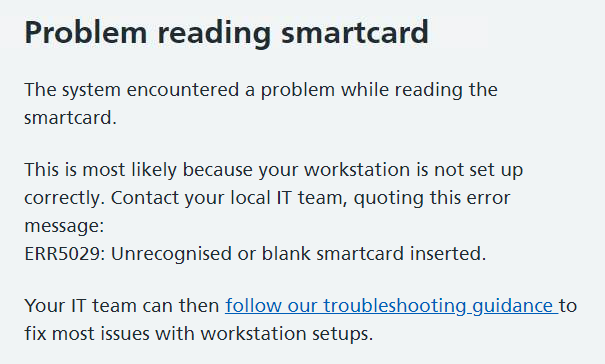
When you are trying to service a user's smartcard in Care Identity Management, you enter the smartcard into a second smartcard reader and continue, but see a 'Problem reading smartcard' error, with an error code ERR5029.
Cause
This can happen because the smartcard:
- is blank
- has been inserted the wrong way round or upside down in the reader
- is damaged
Other causes:
- it is a series 9 smartcard and the PIV minidriver is not installed on the workstation
- the smartcard reader drivers need to be updated
- the smartcard was issued for a path-to-live (PTL) environment and is not normally used to access live patient data
What to do: IT teams
Check the PIV mini driver is installed
The PIV mini driver is essential for users with series 9 smartcards. It should already be present if automatic Windows updates are enabled.
If it's not present, download the PIV mini driver and follow the installation instructions.
Check smartcard reader setup
It's important that a supported smartcard reader is used and that its drivers are up to date. Read our guidance on smartcard reader setup.
NHS England Diagnostic Tool
Download the NHS England Diagnostic Tool and generate a diagnostic log for the workstation.
The Diagnostic Tool should be the first resort for all Care Identity Service troubleshooting on a user's machine, where the cause is unclear. The vast majority of reported problems can be diagnosed and fixed using this. You will need local machine admin access to run the tool and complete any fixes that it highlights.
Contact the National Service Desk
If you have been through all the steps above but still cannot progress, you should raise a case to the National Service Desk on the NHS Digital Customer Portal or email [email protected]
To get the best service, follow these instructions when writing your support request:
Short description ERR5029: Unrecognised or blank smartcard inserted
Long description
I am a member of the IT team for my organisation.
A user is trying to [action they are trying to do e.g. print smartcard]
They get the following error:
ERR5029: Unrecognised or blank smartcard inserted
-
I have followed the troubleshooting steps as described here: https://digital.nhs.uk/services/care-identity-service/setting-up-and-troubleshooting/common-issues/err5029-unrecognised-or-blank-smartcard-inserted
-
I attach a copy of the diagnostic log for the workstation(s)
-
I confirm that the workstation conforms to the Warrantied Environment Specification
-
This affects X number of users
-
The Error Response ID is [add ID - only include this if the Error Response ID is shown on the error page]
Last edited: 28 October 2025 1:03 pm