Deprecation notice: smartcard series 4, 5 and 6 (Gemplus, JCOP41 & JCOP 41)
Care Identity Service no longer supports authentication with series 4, 5 or 6 smartcards.
Key dates
- Authentication with series 4 smartcards was permanently blocked on 1 April 2026.
- Authentication with series 5 and 6 smartcards was permanently blocked on 7 May 2026.
- Other national services, including prescription signing, may stop supporting series 4, 5 and 6 smartcards at any time.
What this means for you
In line with previously communicated dates, series 4, 5 and 6 smartcards should be removed from your organisation now.
All organisations are also required to deploy the latest version of the Oberthur middleware on all machines. Read guidance on how to do this.
Replacing older smartcards
The NHS England Registration Authority hardware team are able to supply smartcards in support of this deprecation work at request.
Why we're doing this
EPS prescriptions require a SHA256 hash to sign electronic prescriptions. This is only available on version 8 and above smartcards.
Removing legacy smartcards will also allow us to remove the Gemalto middleware requirement from the estate. This middleware causes significant issues for organisations and removing it will simplify smartcard operations including issuance and Registration Authority unlock.
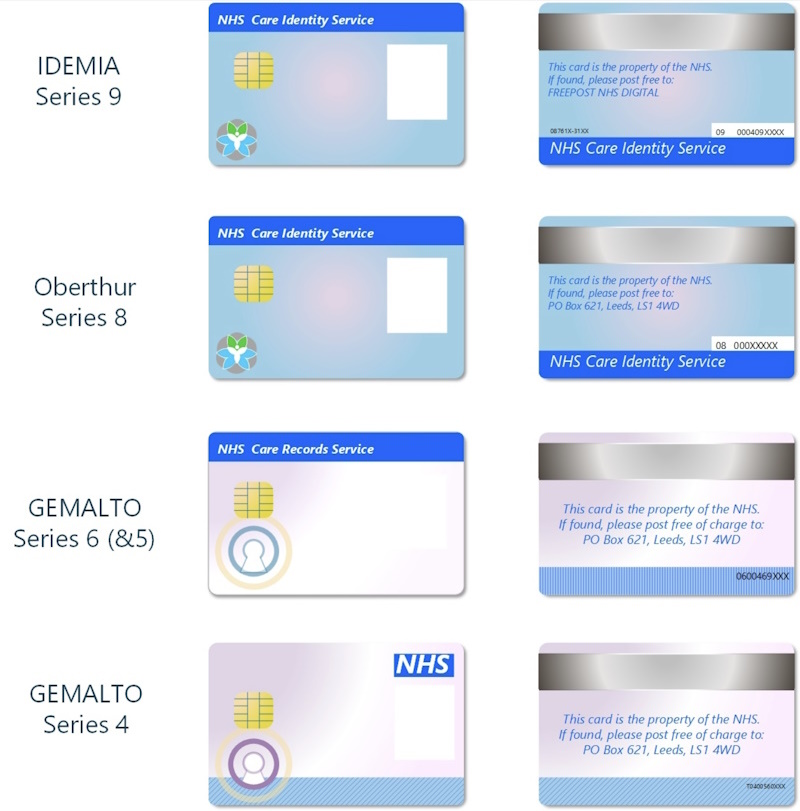
Identifying smartcard series
The image below shows examples of smartcards of different series.
Using Care Identity Management reports to identify a smartcard's series number
Registration Authority Managers, Agents and Advanced Agents can use the reports functionality in Care Identity Management to identify older smartcards in their organisation.
Read how to use reports to find older smartcards.
Using the Diagnostic Tool to identify a smartcard's series number
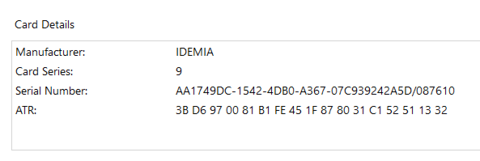
You can also use the NHS England Diagnostic Tool to identify smartcard series.
Within the tool:
- select 'Card Reader Management'
- select the target smartcard reader where the smartcard is present
You'll then see the smartcard series number in the details shown.
More information
If you have any questions, contact us at [email protected]
Last edited: 7 May 2026 8:24 am