CIS2 Authentication Release 11.01
Release date 8 December 2025 (subject to final approval)
Discontinuation of the form_post value for the response_mode parameter in authentication requests
As part of our ongoing enhancements to the CIS2 Authentication service, we will be discontinuing support for the form_post value in the response_mode parameter within authentication requests.
In line with our published guidance, CIS2 Authentication only supports response_mode=query. Any other unsupported response mode values will soon stop functioning, which may result in authentication failures.
We have proactively contacted all identified systems currently using response_mode=form_post so changes can be implemented ahead of time and service disruption can be avoided.
If you require clarification or assistance, please reach out to us and we’ll be happy to help.
Deployment schedule
-
INT: 4 December
-
LIVE: 8 December
What this means for you
Health and social care professionals:
- Should experience no change.
Organisations providing IT Support for health and social care professionals:
- Should experience no change.
Health and social care application suppliers:
- If your system is using unsupported values after the 8 December 2025, your customers will receive authentication failures.
Registration Authorities:
- Should experience no change.
Why we are doing this
Providing a high quality of authentication requires that we also maintain our underlying platform to a high level of security and resilience.
Visuals and links added to improve the self-service authenticator binding experience
In response to feedback around the self-service binding experience for the authenticator app, we've updated key stages of the flow to make it easier for users self-servicing their binding.
What this means for you
Health and social care professionals:
- The step to scan the QR code with your Authenticator app has been updated so the steps in the registration process are clearer. We have:
- updated the on screen instructions so that they more clearly lay out how to scan the QR code successfully
- made the link for users accessing the registration page directly on a mobile device more easy to find
- added a checkbox to ensure users are returning to the registration page once they've completed scanning the QR code to finish registration correctly
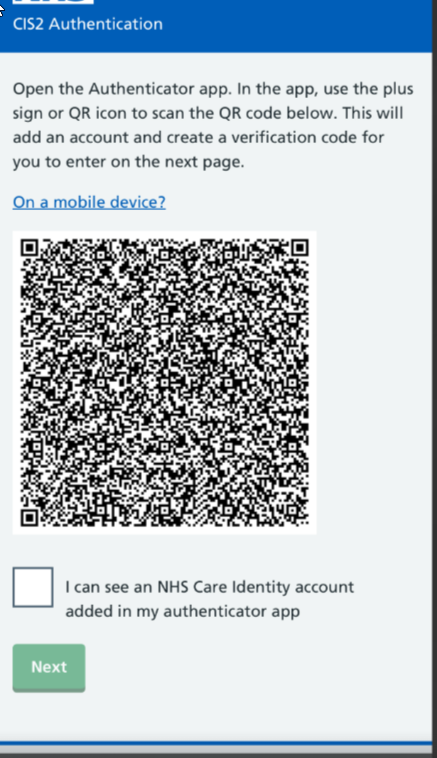
We also know that you may have multiple credentials in your authenticator app, and finding the one you need may be difficult. To help you identify the right code, we've provided an example in the following step of what the six-digit passcode will look like in your authenticator app.
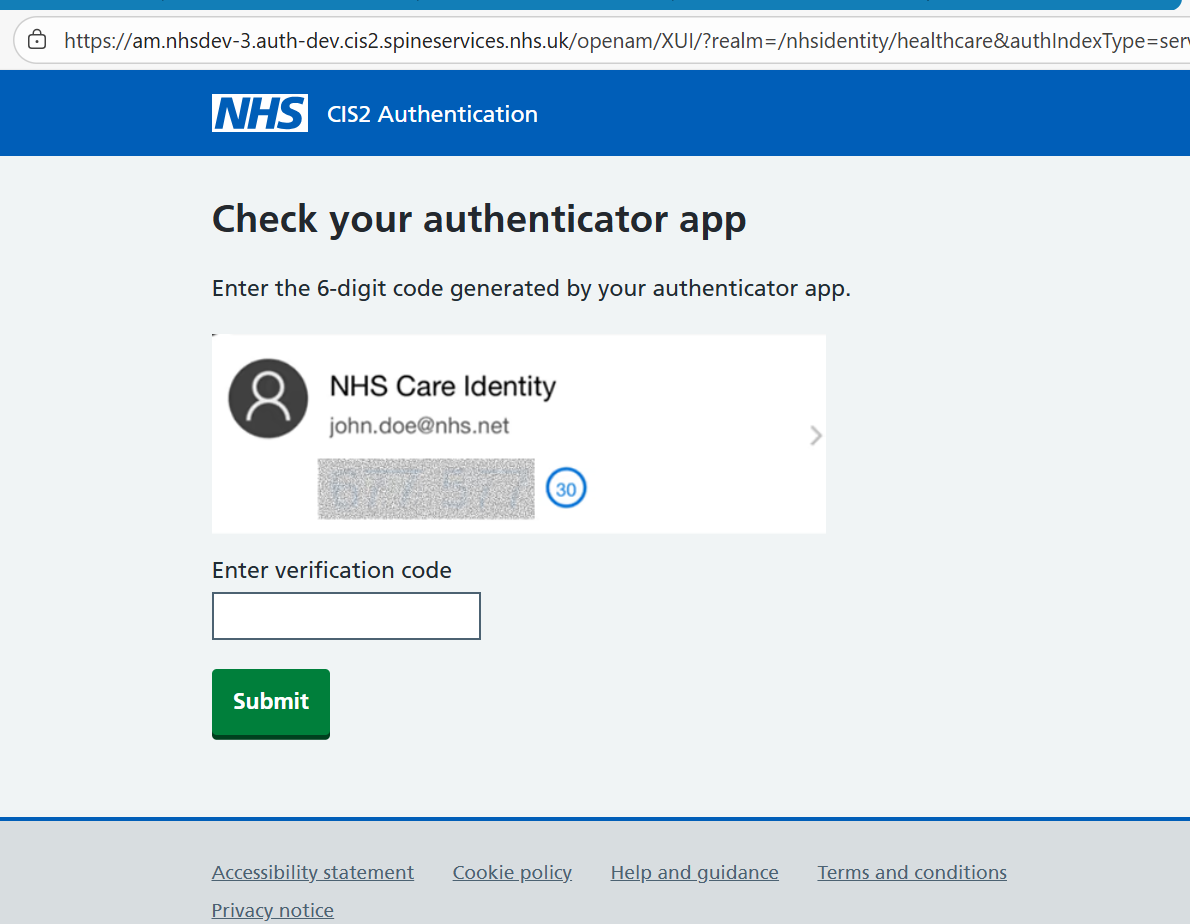
Organisations providing IT support for health and social care professionals:
- The pages for scanning the QR code and adding a one-time passcode from the authenticator app will look slightly different. If you have documentation and guides for these journeys, you may want to update any images after the release.
Health and social care application suppliers:
- Should experience no change.
Registration Authorities
- The pages for scanning the QR code and adding a one-time passcode from the authenticator app will look slightly different. If you have documentation and guides for these journeys, you may want to update any images after the release.
Why we are doing this
We received feedback from health and care professionals entering the self-service binding journey that certain steps of the journey are confusing and hard to follow. In order to improve the user experience, we've updated our instructions so they more clearly point towards the correct steps.
Last edited: 4 December 2025 10:13 am