Personal Demographics Service change event
The PDS record change event notifies subscribers when a patient's record in the Personal Demographics Service (PDS) has been updated.
Overview
The PDS record change event notifies subscribers when a patient's record in the Personal Demographics Service (PDS) has been updated.
This event follows a notification and retrieval pattern. It does not include the updated patient data. Instead, it signals that a change has occurred so that your system can retrieve the latest version of the patient record from PDS.
This approach ensures that PDS remains the source of truth for patient demographics:
-
publisher: Personal Demographics Service (PDS)
-
event name: pds-record-change-2
-
delivery mechanism: Multicast Notification Service (MNS)
-
payload type: Notification (signal only)
-
data retrieval: Requires a follow-up call to PDS, which should be the PDS FHIR API for new services onboarding, otherwise legacy systems may use their existing legacy messaging.
For general guidance on using MNS, refer to the MNS service page.
Event status
This event is currently in private beta.
When should I use this event?
Use this event if your system:
-
stores local copies of patient demographic data
-
needs to stay aligned with PDS updates
-
can retrieve updated data from PDS when notified
Example use cases
-
GP and primary care systems maintaining patient records
-
administrative systems synchronising demographic data
-
services managing patient cohorts
-
systems responding to changes in registration or demographics
How this event works
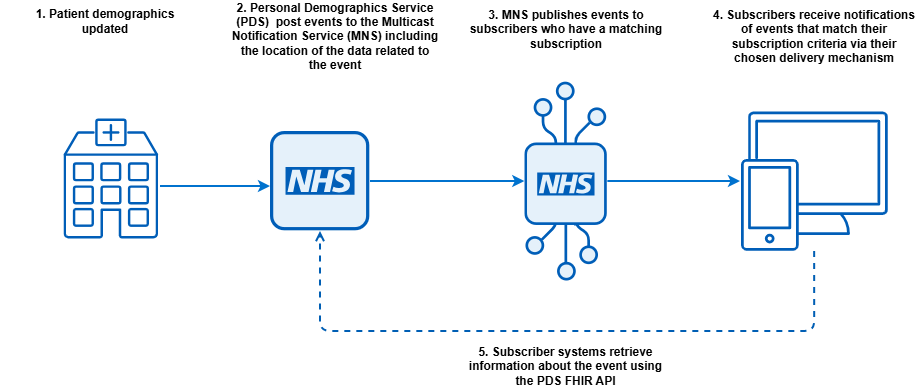
This event follows a notification and retrieval pattern:
-
A patient record is created or updated in PDS.
-
A change event is published.
-
The event is delivered to a subscribed system via MNS.
-
Your system receives the event.
-
Your system retrieves the latest patient record using the NHS number.
-
Your system applies the latest data.
Event structure
This event is available in both FHIR and CloudEvents formats.
- FHIR events are accessible to both internal and external subscribers.
- CloudEvents format can be accessed by internal subscribers only.
| CloudEvents | FHIR | Type | Mandatory | Cardinality | Description |
|---|---|---|---|---|---|
| specversion | n/a |
String |
M |
1..1 |
Indicates this is a version 1 CloudEvent. Always"1.0" |
| id | id | GUID | M |
1..1 |
GUID - for this event |
| source |
source |
URI |
M |
1..1 |
The publisher of the event. Not the original service which triggered the change |
| type |
event-type |
String |
M |
1..1 |
name of the event, will always be pds-record-change-2 |
| time |
timestamp |
Timestamp | M |
1..1 |
Time of the event ISO 8601 |
| subject |
subject |
String |
M |
1..1 |
NHS number of the patient |
| versionid |
version-id |
String |
M |
1..1 |
The NHS Digital assigned version of the patient resource. This is the meta.versionId attribute in a patient resource body in the PDS FHIR API. It may also be referred to as the Serial Change Number (SCN) in older documentation. |
Example FHIR event
{
  "resourceType": "Bundle",
  "id": "deb6ed8d-c54a-4489-8609-b15baf927541",
  "type": "history",
  "timestamp": "2020-06-01T13:00:00Z",
  "entry": [
    {
      "fullUrl": "urn:uuid:7c38eb82-9186-402f-a120-94c29ceddb48",
      "resource": {
        "resourceType": "Parameters",
        "meta": {
          "profile": [
            "http://hl7.org/fhir/uv/subscriptions-backport/StructureDefinition/backport-subscription-status-r4"
          ]
        },
        "id": "7c38eb82-9186-402f-a120-94c29ceddb48",
        "parameter": [
          {
            "name": "subscription",
            "valueReference": {
              "reference": "https://api.service.nhs.uk/multicast-notification-service/subscriptions"
            }
          },
          {
            "name": "status",
            "valueCode": "active"
          },
          {
            "name": "type",
            "valueCode": "event-notification"
          },
          {
            "name": "notification-event",
            "part": [
              {
                "name": "event-number",
                "valueString": "1"
              },
              {
                "name": "timestamp",
                "valueInstant": "2020-06-01T13:00:00Z"
              }
            ]
          },
          {
            "name": "additional-context",
            "part": [
              {
                "name": "event-type",
                "valueString": "pds-record-change-2"
              },
              {
                "name": "source",
                "valueUri": "https://fhir.nhs.uk/Id/nhsSpineASID/477121000324"
              },
              {
                "name": "subject",
                "valueReference": {
                  "identifier": {
                    "value": "9912003888"
                  }
                }
              },
              {
                "name": "version-id",
                "valueString": "W/\"4\""
              }
            ]
          }
        ]
      },
      "request": {
        "method": "GET",
        "url": "https://api.service.nhs.uk/multicast-notification-service/subscriptions"
      },
      "response": {
        "status": "200"
      }
    }
  ]
}
CloudEvent example
{
    "specversion": "1.0",
    "id": "236a1d4a-5d69-4fa9-9c7f-e72bf505aa5b",
    "source": "https://fhir.nhs.uk/Id/nhsSpineASID/477121000324",
    "type": "pds-record-change-2",
    "time": "2020-06-01T13:00:00Z",
    "subject": "9912003888",
    "versionid": "W/\"2\""
}
Subscription filters
You can filter the events you want to receive using the criteria field in the subscription payload. You should only be subscribing to events you need to receive and must not create filters wider than required, for example, subscribing to all patients.
Subscription examples contains some common example use cases.
Negative filters are not supported, for example you cannot set the subscription criteria to "eventType='pds-record-change-2' AND 'changed_address=False'" to receive all changes except address. In the table below the filters which are Boolean should only be set to True.
When a resource is removed from a patient record you will receive an event. When you retrieve the record the resource will not be present. For example, if you filter for changed_name and a temporary name is removed you will receive an event and when you retrieve the record the name resource will no longer contain the temporary name.
If the patient has a confidentiality status of sensitive, you will receive notification of changes to location information, but you will only see the sensitive data if you are permissioned to do so.
Note in all cases the abbreviation gp refers to General Practice and not an individual General Practitioner.
| Filter name | Filter subscription type | PDS FHIR schema name | Description |
|---|---|---|---|
|
changed_address |
Boolean | address | Will be present (true) if the patients address changes. |
|
changed_birthdate |
Boolean | birthDate | Will be present (true) if the patients date of birth changes. |
|
changed_contactpreference |
Boolean |
Extension-UKCore-ContactPreference (format/method) |
Will be present (true) if the patients preferred contact preference changes. |
|
changed_deathstatus |
Boolean |
Extension-UKCore-DeathNotificationStatus |
Will be present (true) if the patients death status changes. |
|
changed_dispenser |
Boolean |
|
Will be present (true) if the patients nominated pharmacy, dispensing doctor or medical appliance supplier changes. |
|
changed_gender |
Boolean | gender | Will be present (true) if the patients gender changes. |
|
changed_gp_to |
String ODS code |
generalPractitioner.identifier.value | Will be present if the patients general practice registration changes, this will be the ODS code of the newly registered practice |
|
changed_gp_to_manufacturer_org |
String ODS code |
n/a | Will be present if the patients general practice registration changes, this will be the NACS code for the supplier of the newly registered practice. |
|
changed_name |
Boolean | name | Will be present (true) if any of the names associated with the patient change. |
|
changed_nhscommunication |
Boolean |
Extension-UKCore-NHSCommunication (language/interpreter) |
Will be present (true) if the patients communication preferences change, including language or interpreter. |
|
changed_nhsnumber |
Boolean | id | Will be present (true) if the patients NHS number has changed. A retrieval using the original NHS number (in the source field) will return the replacement record with the new NHS number |
|
changed_security |
Boolean | meta.security | Will be present (true) if the patients security flag changes. This would indicate a change in the level of security on the patient (sensitive/restricted) or the NHS number has become invalidated and should no longer be used. |
|
changed_telecom |
Boolean | telecom | Will be present (true) if a contact point for the patient such as phone number or email has changed. |
|
nhsnumber |
String NHS number |
id | Will be present as a string enabling events to be filtered via the NHS Number. In the case of an NHS Number change, this will contain the original NHS Number retrieving the patient record will return the new number. |
|
registeredgpodscode |
String ODS code |
generalPractitioner.identifier.value |
This is the General Practice (not practitioner) despite the FHIR name. Will be present as a string so events can be filtered via the GP Practice ODS code. If the registered GP changes this will be the ODS code of the old general practice. Allowing the old practice to be notified when a patient has left, changed_gp_to will contain the new general practice. If a filter of null is set then events will be sent when the patient becomes unregistered. If only the GP provider is changed or removed the above applies, to allow subscribers to see the change in GP. |
|
registeredgpodscode_manufacturer_org |
String ODS code |
n/a | Will be present as a string so events can be filtered via the NACS code of the system supplier of the GP practice, if the registered GP has changed this will be the NACS code of the supplier of the previous practice. |
Subscription examples
All the following examples contain the criteria string that forms part of the subscription.
Subscribing to all changes for an individual patient
eventType='pds-record-change-2' AND nhsnumber='<patient NHS number>'
Subscribing to death status changing for an individual patient
eventType='pds-record-change-2' AND nhsnumber='<patient NHS number>' AND changed_deathstatus=True
Patients who have left a specific practice and are no longer registered
eventType='pds-record-change-2' AND changed_gp_to IS NULL AND registeredgpodscode = '<ODS Code of GP practice>'
Subscribing to all changes to patients registered at a GP practice
eventType='pds-record-change-2' AND registeredgpodscode='<ODS Code of GP practice>'
Subscribing to all patients registering or leaving a GP practice
If you do not need to differentiate the event until the patient retrieval to determine if the patient has registered or left the practice, then both events could be delivered on the same stream.
eventType='pds-record-change-2' AND (changed_gp_to='<ODS Code of GP practice>' OR registeredgpopscode='<ODS Code of GP practice>')
Alternatively create two subscriptions:
eventType='pds-record-change-2' AND changed_gp_to='<ODS Code of GP practice>' and eventType='pds-record-change-2' AND registeredgpopscode='<ODS Code of GP practice>'
Then you can distinguish by:
- inspecting the event metadata
- SQS delivered events have the message attribute X-MNS-Subscription-ID which will look like {"StringValue": "<subscription_id>", "DataType": "String"}
- MESH delivered events have a subject with the format: <subscription_id>_<event_timestamp>
- sending them to different destinations: a "changed to to" queue/mailbox and a "changed gp from" queue/mailbox
Subscribing to all death events to all patients
This subscription should only be used for a legitimate need to be notified of all patients, typically a national system.
eventType='pds-record-change-2' AND changed_deathstatus=True
Onboarding
To subscribe to this event, you will need to:
- complete onboarding to PDS FHIR API (if data retrieval is required)
- complete onboarding for MNS
-
use the Subscription API to create a subscription
-
configure an endpoint to receive event notifications
Refer to Subscribe to Multicast Notification Service for further guidance.
Versioning
pds-record-change-2 is the only version of this event.
This should be used in preference to:
Testing
These events are available in the Path to Live environments (PTL). To test receiving an event, you will need to initiate a change to a demographics record in your test pack that you received when you onboarded to demographics in PTL.
Last edited: 5 June 2026 2:30 pm